 A few years back I wrote a small jQuery plug-in used for monitoring changes to CSS styles of a DOM element. The plug-in allows for monitoring CSS styles and Attributes on an element and then getting notified if the monitored CSS style changed. This can be useful to sync up to objects or to take action when certain conditions are true after an element update.
The original plug-in worked, but was based on old APIs that have now been deprecated in some browsers. There’s always been a fallback to a very inefficient polling mechanism and that’s what unfortunately had now become the most common behavior. Additionally some jQuery changes after 1.8.3 removed some browser detection features (don’t ask!) and that actually broke the code. In short the old plug-in – while working – was in serious need of an update. I needed to fix this plug-in for my own use as well as for reports from a few others using the code from the previous post.
As a result I spent a few hours today updating the plug-in and creating a new version of the jquery-watch plug-in. In the process I added a few features like the ability to monitor Attributes as well as CSS styles and moving the code over to a GitHub repository along with some better documentation and of course it now works with newer APIs that are supported by most browsers.
You can check out the code online at:
Here’s more about how the plug-in works and the underlying MutationObserver API it now uses.
MutationObserver to the Rescue
In the original plug-in I used DOMAttrModified and onpropertychange to detect changes. DOMAttrModified looked promising at the time and Mozilla had it implemented in Mozilla browsers. The API was supposed to become more widely used, and instead the individual DOM mutation events became marked as obsolete – it never worked in WebKit. Likewise Internet Explorer had onpropertychange forever in old versions of IE. However, with the advent of IE 9 and later onpropertychange disappeared from Standards mode and is no longer available.
Luckily though there’s now a more general purpose API using the MutationObserver object which brings together the functionality of a number of the older mutation events in a single API that can be hooked up to an element. Current versions of modern browsers all support MutationObserver – Chrome, Mozilla, IE 11 (not 10 or earlier though!), Safari and mobile Safari all work with it, which is great.
The MutationObserver API lets you monitor elements for changes on the element, in it’s body and in child elements and from my testing this interface here on both desktop and mobile devices it looks like it’s pretty efficient with events being picked instantaneously even on moderately complex pages/elements.
Here’s what the base syntax looks like to use MutationObserver:
var element = document.getElementById("Notebox");

var observer = new MutationObserver(observerChanges);
observer.observe(element, {
    attributes: true,
    subtree: opt.watchChildren,
    childList: opt.watchChildren,
    characterData: true
});

/// when you're done observing
observer.disconnect();

function observerChanges(mutationRecord, mutationObserver) {
    console.log(mutationRecord);
}
You create a MutationObserver instance and pass a callback handler function that is called when a mutation event occurs. You then call the .observe() method to actually start monitoring events. Note that you should store away the MutationObserver instance somewhere where you can access it later to call the .disconnect() method to unload the observer. This turns out is pretty important as you need to also watch for recursive events and need to unhook and rehook the observer potentially in the callback function. More on the later when I get back to the plug-in.
Note that you can specify what you want to look at. You can look at the current element’s attributes, the character content as well as the DOM subtree so you can actually detect child element changes as well. If you’re only interested in the actual element itself be sure to set childlist and subtree to false to avoid the extra overhead of receiving events for children.
The callback function receives a mutationRecord and an instance of the mutation observer itself. The mutationRecord is the interesting part as it contains information about what was modified in the element or subtree. You can receive multiple records in a single call which occurs if multiple changes are made to the same attribute or DOM operation.
Here’s what the Mutation record looks like:
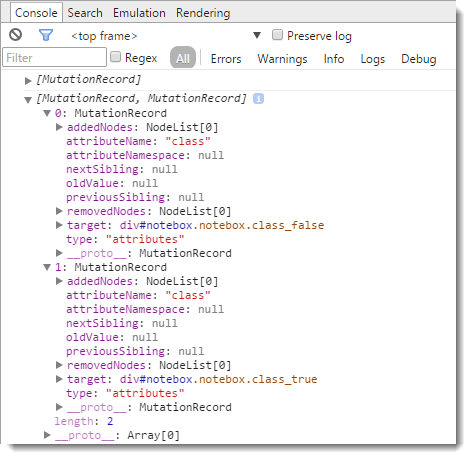
You can see that you that you get information about whether the actual element was changed via the attributeName or you check for added and removed nodes in child elements. In the example above I used code to make a change to the Class element – twice. I did a jQuery .removeClass(), followed by an addClass(), which triggered these two mutation records.

Note that you don’t have to look at the actual mutation record itself and you can use the MutationObserver merely as a mechanism that something has changed. In the jquery-watch plug-in I’m about to describe, the plug-in keeps track of the properties we’re interested in and it simply reads the properties from the DOM when a change is detected and acts upon that. While a little less efficient it makes for much simpler code and more control over what you’re looking for.
Adapting the jquery-watch plug-in
So the updated version of the jquery-watch plug-in now uses the MutationObserver API with a fallback to setInterval() polling for events. The plug-in syntax has also changed a little to pass an options object instead of a bunch of parameters that were passed before in order to allow for additional options. So if you’re updating from an older version make sure you check your calls to this plug-in and adjust for the new parameter signature.
First add a reference to jQuery and the plug-in into your page:
<script src="//ajax.googleapis.com/ajax/libs/jquery/1.11.1/jquery.min.js"></script>
<script src="scripts/jquery-watch.js"></script>
Then simply call the .watch() method on a jQuery selector:
// hook up the watcher
$("#notebox").watch({
    // specify CSS styles or attribute names to monitor
    properties: "top,left,opacity,attr_class",

    // callback function when a change is detected
    callback: function(data, i) {
        var propChanged = data.props[i];
        var newValue = data.vals[i];

        var el = this;
        var el$ = $(this);

        // do what you need based on changes
        // or do your own checks
    }
});
The two required option parameters are shown here: A comma delimited list of CSS styles or Attribute names. Attribute names need to be prefixed with a attr_ as in attr_class or attr_src etc. You also need to give a callback function that receives notifications when a change event is raised. The callback is called whenever one of the specified properties changes. The callback function receives a data object and an index. The data object contains .props and .vals arrays, which hold properties monitored and the value that was just captured. The index is the index into these arrays for the property that triggered the change event in the first place. The this pointer, is scoped to the element that initiated the change event – the element jQuery-watch is watching.
Note that you don’t have to do anything with the parameters – in fact I typically don’t. I usually only care to be notified and then check other values to see what I need to adjust, or just set a number of values in batch.
A quick Example – Shadowing and Element
Let’s look at a silly example that nevertheless demonstrates the functionality nicely. Assume that I have two boxes on the screen and I want to link them together so that when I move one the other moves as well. I also want to detect changes to a couple of other states. I want to know when the opacity changes for example for a fade out/in so that both boxes can simultaneously fade. I also want to track the display style so if the box is closed via code the shadow goes away as well. Finally to demonstrate attribute monitoring, I also want to track changes to the CSS classes assigned to the element so I might want to monitor the class attribute.
Let’s look at the example in detail. There are a couple of div boxes on a page:
<div class="container">

    <div id="notebox" class="notebox">
        <p>
            This is the master window. Go ahead drag me around and close me!
        </p>
        <p>
            The shadow window should follow me around and close/fade when I do.
        </p>
        <p>
            There's also a timer, that fires and alternates a CSS class every
            3 seconds.
        </p>
    </div>

    <div id="shadow" class="shadow">
        <p>I'm the Shadow Window!</p>
        <p>I'm shadowing the Master Window.</p>
        <p>I'm a copy cat</p>
        <p>I do as I'm told.</p>
    </div>

</div>
#notebox is the master and #shadow is the slave that mimics the behavior in the master.
Here’s the page code to hook up the monitoring:
var el = $("#notebox");
el.draggable().closable();

// Update a CSS Class on a 3 sec timer
var state = false;
setInterval(function () {
    $("#notebox")
        .removeClass("class_true")
        .removeClass("class_false")
        .addClass("class_" + state);
    state = !state;
}, 3000);

// *** Now hook up CSS and Class watch operation
el.watch({
    properties: "top,left,opacity,display,attr_class",
    callback: watchShadow
});

// this is the handler function that responds
// to the events. Passes in:
// data.props[], data.vals[] and an index for active item
function watchShadow(data, i) {

    // you can capture which attribute has changed
    var propChanged = data.props[i];
    var valChanged = data.vals[i];

    showStatus(" Changed Property: " + propChanged +
        "  -  New Value: " + valChanged);

    // element affected is 'this' #notebox in this case
    var el = $(this);
    var sh = $("#shadow");

    // get master current position
    var pos = el.position();
    var w = el.outerWidth();
    var h = el.outerHeight();

    // and update shadow accordingly
    sh.css({
        width: w,
        height: h,
        left: pos.left + w + 4,
        top: pos.top,
        display: el.css("display"),
        opacity: el.css("opacity")
    });

    // Class attribute is more tricky since there are
    // multiple classes on the parent - we have to explicitly
    // check for class existance and assign
    sh.removeClass("class_true")
        .removeClass("class_false");
    if (el.hasClass("class_true"))
        sh.addClass("class_true");
}
The code starts out making the #notebox draggable and closable using some helper routines in ww.jquery.js. This lets us test changing position and closing the #notebox so we can trigger change events. The code also sets up a recurring 3 second switch of a CSS class in the setInterval() code.
Then the actual $().watch() call is made to start observing various properties:
el.watch({
    properties: "top,left,opacity,display,attr_class",
    callback: watchShadow
});
This sets up monitoring for 4 CSS styles, and one attribute. Top and left are for location tracking, opacity handles the fading and display the visibility. attr_class (notice the attr_ prefix for an attribute) is used to be notified when the CSS class is changed every 3 seconds. We also provide a function delegate that is called when any of these properties change specifically the watchShadow function in the example.
watchShadow accepts two parameters – data and an index. data contains props[] and vals[] arrays and the index points at the items that caused this change notification to trigger. Notice that I assign the propChanges and newValue variables, but they are actually not used which is actually quite common. Rather I treat the code here as a mere notification and then update the #shadow object based on the current state of #notebox.

When you run the sample, you’ll find that the #shadow box moves with #notebox as it is dragged, fades and hides when #notebox fades, and adjusts its CSS class when the class changes in #notebox every 3 seconds. If you follow the code in watchShadow you can see how I simply recalculate the location and update the CSS class according to the state of the parent.
Note, you aren’t limited to simple operations like shadowing. You can pretty much do anything you like in this code block, such as detect a change and update a total somewhere completely different in a page.
The actual jquery-watch Plugin
Here’s the full source for the plug-in so you can skim and get an idea how it works (you can also look at the latest version on Github):
/// <reference path="jquery.js" />
/*
jquery-watcher
Version 1.11 - 10/27/2014
(c) 2014 Rick Strahl, West Wind Technologies
www.west-wind.com

Licensed under MIT License
http://en.wikipedia.org/wiki/MIT_License
*/
(function ($, undefined) {
    $.fn.watch = function (options) {
        /// <summary>
        /// Allows you to monitor changes in a specific
        /// CSS property of an element by polling the value.
        /// when the value changes a function is called.
        /// The function called is called in the context
        /// of the selected element (ie. this)
        ///
        /// Uses the MutationObserver API of the DOM and
        /// falls back to setInterval to poll for changes
        /// for non-compliant browsers (pre IE 11)
        /// </summary>
        /// <param name="options" type="Object">
        /// Option to set - see comments in code below.
        /// </param>
        /// <returns type="jQuery" />

        var opt = $.extend({
            // CSS styles or Attributes to monitor as comma delimited list
            // For attributes use a attr_ prefix
            // Example: "top,left,opacity,attr_class"
            properties: null,

            // interval for 'manual polling' (IE 10 and older)
            interval: 100,

            // a unique id for this watcher instance
            id: "_watcher",

            // flag to determine whether child elements are watched
            watchChildren: false,

            // Callback function if not passed in callback parameter
            callback: null
        }, options);

        return this.each(function () {
            var el = this;
            var el$ = $(this);
            var fnc = function (mRec, mObs) {
                __watcher.call(el, opt.id, mRec, mObs);
            };

            var data = {
                id: opt.id,
                props: opt.properties.split(','),
                vals: [opt.properties.split(',').length],
                func: opt.callback, // user function
                fnc: fnc, // __watcher internal
                origProps: opt.properties,
                interval: opt.interval,
                intervalId: null
            };
            // store initial props and values
            $.each(data.props, function(i) {
                if (data.props[i].startsWith('attr_'))
                    data.vals[i] = el$.attr(data.props[i].replace('attr_',''));
                else
                    data.vals[i] = el$.css(data.props[i]);
            });

            el$.data(opt.id, data);

            hookChange(el$, opt.id, data);
        });

        function hookChange(element$, id, data) {
            element$.each(function () {
                var el$ = $(this);

                if (window.MutationObserver) {
                    var observer = el$.data('__watcherObserver');
                    if (observer == null) {
                        observer = new MutationObserver(data.fnc);
                        el$.data('__watcherObserver', observer);
                    }
                    observer.observe(this, {
                        attributes: true,
                        subtree: opt.watchChildren,
                        childList: opt.watchChildren,
                        characterData: true
                    });
                } else
                    data.intervalId = setInterval(data.fnc, interval);
            });
        }

        function __watcher(id,mRec,mObs) {
            var el$ = $(this);
            var w = el$.data(id);
            if (!w) return;
            var el = this;

            if (!w.func)
                return;

            var changed = false;
            var i = 0;
            for (i; i < w.props.length; i++) {
                var key = w.props[i];

                var newVal = "";
                if (key.startsWith('attr_'))
                    newVal = el$.attr(key.replace('attr_', ''));
                else
                    newVal = el$.css(key);

                if (newVal == undefined)
                    continue;

                if (w.vals[i] != newVal) {
                    w.vals[i] = newVal;
                    changed = true;
                    break;
                }
            }
            if (changed) {
                // unbind to avoid recursive events
                el$.unwatch(id);

                // call the user handler
                w.func.call(el, w, i, mRec, mObs);

                // rebind the events
                hookChange(el$, id, w);
            }
        }
    }
    $.fn.unwatch = function (id) {
        this.each(function () {
            var el = $(this);
            var data = el.data(id);
            try {
                if (window.MutationObserver) {
                    var observer = el.data("__watcherObserver");
                    if (observer) {
                        observer.disconnect();
                        el.removeData("__watcherObserver");
                    }
                } else
                    clearInterval(data.intervalId);
            }
            // ignore if element was already unbound
            catch (e) {
            }
        });
        return this;
    }
    String.prototype.startsWith = function (sub) {
        if (sub === null || sub === undefined) return false;
        return sub == this.substr(0, sub.length);
    }
})(jQuery, undefined);
There are a few interesting things to discuss about this code. First off, as mentioned at the outset the key feature here is the use of the MutationObserver API which makes the fast and efficient monitoring of DOM elements possible. The hookChange() function is responsible for hooking up the observer and storing a copy of it on the actual DOM element so we can reference it later to remove the observer in the .unwatch() function.
For older browsers there’s the fallback to the nasty setInterval() code which simply fires a check at a specified interval. As you might expect this is not very efficient as the properties constantly have to be checked whether there are changes or not. Without a notification an interval is all we can do here. Luckily it looks like this is now limited to IE 10 and earlier for now which is not quite optimal but at least functional on those browser. IE 8 would still work with onPropertyChange but I decided not to care about IE 8 any longer. IE9 and 10 don’t have onPropertyChange event any longer so setInterval() is the only way to go there unfortunately.
Another thing I want to point out is that the __watcher() function which is the internal callback that gets called when a change occurs. It fires on all mutation event notifications and then figures out whether something we are monitoring has changed. If it is it forwards the call to your handler function.
Notice that there’s code like this:
if (changed) {
  // unbind to avoid event recursion
  el$.unwatch(id);

  // call the user handler
  w.func.call(el, w, i);

   // rebind the events
   hookChange(el$, id, w);
}
This might seem a bit strange – why am I unhooking the handler before making the callback call? This code removes the MutationObserver or setInterval() for the duration of the callback to your event handler.
The reason for this is that if you make changes inside of the callback that effect the monitored element new events are fired which in turn fire events again on the next iteration and so on. That’s a quick way to an endless loop that will completely lock up your browser instance (try it – remove the unwatch/hookchange calls and click the hide/show buttons that fade out – BOOM!). By unwatching and rehooking the observer this problem can be mostly avoided.
Because of this unwatch behavior, if you do need to trigger other update events through your watcher, you can use setTimeout() to delay those change operations until after the callback has completed. Think long and hard about this though as it’s very easy to get this wrong and end up with browser deadlock. This makes sense only if you act on specific property changes and setting other properties rather than using a global update routine as my sample code above does.
Watch on
I’m glad I found the time to fix this plugin and in the process make it work much better than before. Using the MutationObserver provides a much smoother experience than the previous implementations – presumably this API has been optimized better than DOMAttrModified and onpropertychange were, and more importantly you can control what you want to listen for with the ability to only listen for changes on the actual element.
This is not the kind of component you need very frequently, but if you do – it’s very useful to have. I hope some of you will find this as useful as I have in the past…
Resources
Other Posts you might also like