 |
| White Papers Home | White Papers | Message Board | Search | Products | Purchase | News | |
Using VFP COM Objects with Active Server Pages
Ó Rick
Strahl, West Wind Technologies, 1998-2002
http://www.west-wind.com/
Updated: March 22, 2002
This document discusses how you can use Visual FoxPro COM objects in your Active Server Applications. COM is the primary mechanism employed by ASP to extend the base functionality provided by this popular Web development tool.
This document covers the following topics:
¨ A brief review of Active Server Pages architecture
¨ The basics how to build a VFP COM object for use with ASP
¨ Discussion of how to pass and use the built-in ASP objects with VFP
¨ Sharing VFP generated objects with the calling ASP page
¨ Sharing data between ASP and VFP using ADO objects
¨ Tips on how to debug your servers as you build them and catch errors as you run them
¨ Discussion of how VFP COM objects affect ASP's scalability to serve large loads of Web requests
¨ How Web security affects your COM ASP applications
A short review
of Active Server Pages basics
Active
Server Pages is Microsoft's primary architecture for building Web backend
logic. The concept of ASP is based on a scripting metaphor that allows users to
mix HTML with scripted code in the same document to provide dynamic Web
content. Scripting is not a new concept from Microsoft – tools like Cold Fusion
and even script languages like Perl preceeded ASP many years before Microsoft even
considered the Web platform. However, with ASP Microsoft has legitimized the
concept of scripting with an environment that closely ties into Microsoft's
general Windows system architecture and COM.
One
misconception about ASP is that it's 'way beyond CGI and ISAPI' and other low
level interfaces. The truth is that ASP is really just a specific
implementation of ISAPI in this case that hides the complexity of the
underlying protocols and system interfaces. The Active Server Pages engine is
implemented as a script mapped ISAPI
server extension. The driving engine—ASP.dll—is an ISAPI extension that is called whenever someone accesses a page
with an .ASP extension. A script map in the server's metabase (or registry
settings on IIS 3) causes the ASP script to be redirected to this DLL. Script
maps are meant to give the impression that the developer or user is
"executing" the .ASP page directly, but in reality ASP.dll is invoked
for each .ASP file. ASP.dll hosts the VBScript or JScript interpreter and HTML
parser, which in turn parses the ASP pages, expanding any code inside the page
and converting it to HTTP-compliant output to return to the Web server. The
figure below shows how the architecture is put together.
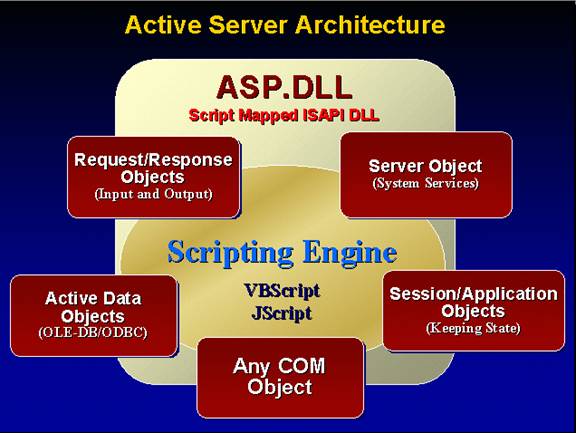
The
script code can use any feature that the scripting language supports. One
important feature of the engine is its ability to support COM objects. ASP
starts up with several built-in COM objects that are always available to you in
your ASP pages. The Request and Response objects handle retrieving input and
sending output for the active Web page. The Server object provides an interface
to system services, the most important of which is the ability to launch COM
objects. The Session and Application objects provide state management to allow
creation of persistent data that has a lifetime of the application or of a
user's session, respectively.
The
figure also shows Active Data Objects. Although ADO is not an intrinsic
component of ASP that must be explicitly created with Server.CreateObject(), it
is so closely related to ASP that it should be listed here. ADO is used to
access any system data source (system DSN or OLE DB provider) on your system
through familiar SQL connection and execution syntax. Finally, you can load any COM object available on the local
system. But there are some limitations: The object must support the IDispatch
interface and late binding in order to be used by ASP, but that's hardly a
limitation since most objects support the dual interface standard. All COM objects
built with Visual FoxPro or Visual Basic support this interface.
Notice
that the ISAPI DLL is the actual host of the scripting engine. ASP.dll is
hosted in the IIS process and the scripting engine, and any in-process COM
objects launched from it also run inside this process.
This
is an important fact—since components run inside of IIS they have the potential
to crash or hang the Web server on failure. Moreover, component development can
be very tricky because components running inside IIS can be difficult or
impossible to debug at runtime.
ASP Syntax
I don't want to go into great detail here, but I'll briefly discuss the base ASP syntax for review here. ASP scripting works via markup tags that are embedded directly inside of an ASP document, which is nothing more than a text file. The ASP engine reads the ASP page and parses the code inside of the page, expanding any expressions or code blocks into plain HTTP/HTML output. The result from an ASP page is always plain HTTP/HTML output that contains the expanded output of each script expression in the document. As such, the resulting output can run on any Web browser assuming the author used HTML markup that is compatible on each browser.
Script markup can take three forms:
¨
Expressions
<%=
Expression %>
¨
Code Blocks
<%
Any number of lines of code to execute
%>
¨
Structure
Statements mixed with Markup and/or script code
<%
IF Sex %>
Yes, Please!
<%
ELSE %>
No, Thank you!
<%
END IF %>
The
following example demonstrates these three combinations:
<HTML>
Function/Expression access:
The current time is: <%= now %>
The browser is:
<%= Request.ServerVariables(“USER_AGENT”)
%>
Code can be accessed in blocks:
<%
for x=1 to 100
Response.Write(“Processing line: “ + x)
next x
%>
And you can mix HTML within script constructs:
<% For x =
100 %>
Processing line: <%= x %>
<% next %>
</HTML>
ASP
scripting is deceptively simple and that's really the purpose behind a
scripting engine. The limitations of a scripting engine really lie with the
scripting languages and the syntax that they support. You'll find all of the
basics in VBScript and Jscript, but these languages are very plain.
The
real power of ASP lies in its ability to hook into COM and extend the scripting
interface with both internal and external objects.
ASP Built-in
Objects
VBScript by itself provides no direct support for Web development. Neither does Jscript. ASP provides the Web interface functionality through several built in objects:
|
Object |
What it does |
|
Request |
Handles all input from
HTML forms, the Web server and the browser. The Request object is responsible
for providing the information you need to create queries or act on requests.
The Request object provides a number of collection objects you can access, which
include Form, QueryString, ServerVariables and cookies. |
|
Response |
This object is the
counterpart to the Request object that is responsible for dynamic output. The
basic method is Response.Write(), which allows dynamic creation of text
output to an HTML document that gets sent back to the server and then the
browser. With this object you can control direct output as well as the HTTP
header, including cookies and special features such as redirection and
authentication. |
|
ADO |
Active Data Objects is
an external object that you can use to access any ODBC or OLE DB data source.
This object must be explicitly created with
SERVER.CREATEOBJECT("ADODB.Connection") and/or ADODB.RecordSet. |
|
Server |
The Server object
provides an interface to system services. The most important aspect of the
Server object is its ability to instantiate external COM objects including
Visual FoxPro Automation servers. |
|
Session/Application |
These two powerful
objects allow you to manage state between individual requests. By its nature,
HTTP requests are stateless, meaning the current request knows nothing about
the previous request unless you pass the relevant data to it. These objects
allow attachment of external property values to dynamic objects so you can
create persistent variables that are available for the duration of a user's
connection or an approximation of "global" variables via the
Application object. |
These
objects are crucial to making ASP work by providing the interface to the Web
server allowing to read input, send output and manage state and the system.
Taking
advantage of COM with Active Server Pages
If you've looked at Active Server
Pages, you're probably familiar with using the scripting features of ASP and
accessing database data directly using the Active Data Objects (ADO). Direct database access provides the easiest way
to get at FoxPro or other ODBC/OleDb data quickly. But there are some rather
serious issues with ASP scripting that come down to the limitations of the
scripting model and the limited support for error handling. These issues make
it relatively hard to build mission-critical, bulletproof code with scripting
alone. Furthermore, the scripting nature that mixes code and HTML can easily
lead to heinous spaghetti code that's hard to debug and even harder to fix a
few months after the application goes live. Doing everything in script code
violates a fundamental rule of good application design: Separate the user
interface from the data access code. While it's possible to do all these things
with scripting code, the environment does not encourage it. Scripting requires
you to maintain strict discipline, which may result in bypassing many of the conveniences
that make ASP such an attractive solution in the first place. Finally, script
code is interpreted at runtime and very slow – even when compared to a
non-compiled language like Visual FoxPro. Running similar looping and parsing
code and even ADO recordset loops can run as much as a hundred times faster in
VFP than in an ASP page!
According
to Microsoft scripting was never meant to be the end-all development
environment – rather the scripting engine was designed as a gateway to
interface with databases via ADO and the use of COM for providing the business
layer. Microsoft has long realized that no development tool is an island, and
thus should be extensible. Active Server Pages is no different. With ASP you
have the ability to create any Automation-capable (IDispatch-compatible) COM
object using the Server.CreateObject() method. Once that object has been created, you can access its methods
and properties the same way you can in Visual FoxPro, Visual Basic or any other
Automation-capable client.
COM
is everywhere in Active Server Pages. The entire environment is built on COM.
All the built-in objects – Request, Response, Session, Application and Server -
are COM objects that are exposed with public scope to your ASP pages. ADO which
you use for database access with ASP is implemented as a COM object that you
actually have to create with Server.CreateObject() like any other COM object.
Even the scripting engine is a COM object with a specific interface that can be
extended and allows for custom implementations that can provide their own
syntax (like a third party Perl engine for example).
What's
even more important is ASP's ability to create any COM object and use it from within the script code of the page.
It's very easy to create a VFP COM object and take advantage of Visual FoxPro's
powerful language and fast database access to provide functionality that would
be hard or slow to implement with ASP script code. It also allows you to
partition off business logic into a middle tier rather than creating spaghetti
code at the ASP script level.
COM
is a very powerful extension for ASP, but you should also realize that its use
will make ASP application dramatically more complex from an administrative
point of view. No longer do you deal simply with text documents that you can
upload and replace on a server. No
longer can you easily debug your applications or even simply stop and restart
it. COM objects must be installed and maintained on the server and IIS makes
this process far from trivial when it comes to updating these components in a
live environment. More on this later in the article.
Getting
started with VFP COM Objects
Let's
start with a very simple COM example that you might also find useful. I'm sure
you've seen the counters in use by many Web sites. I'll implement one with
Visual FoxPro by creating a COM object that counts up hits in a database file.
In this example, ASP is used to handle all the HTML and Web-related tasks while
VFP provides the business logic of managing and incrementing the counter.
Here's
the skeleton server code and the implementation of the IncCounter method:
*************************************************************
DEFINE CLASS ASPTools AS Custom OLEPUBLIC
*************************************************************
cAppStartPath = ""
lError = .F.
cErrorMsg = ""
************************************************************************
* WebTools :: Init
*********************************
*** Function: Set the server's environment. VERY IMPORTANT!
************************************************************************
FUNCTION INIT
SET RESOURCE OFF
SET EXCLUSIVE OFF
SET CPDIALOG OFF
SET DELETED ON
SET EXACT OFF
SET SAFETY OFF
SET REPROCESS TO 2 SECONDS
*** Force server into unattended mode – any dialog
*** will cause an error with error message
SYS(2335,0)
*** If you use a SQL backend use this to prevent login dialogs!
* SQLSetProp(0,"DispLogin",3)
*** Utility routines like GetAppStartPath etc.
SET PROCEDURE TO wwUtils ADDITIVE
THIS.cAppStartPath = AddBS(JustPath(Application.ServerName))
*** Important: We need to get at our data
SET PATH TO (THIS.cAppStartpath)
DO PATH WITH "DATA"
ENDFUNC
************************************************************************
* WebTools :: IncCounter
*********************************
*** Function: Increments a counter in the registry.
*** Assume: Key:
*** HKEY_LOCAL_MACHINE\
*** SOFTWARE\West Wind Technologies\Web Connection\Counters
*** Pass: lcCounter - Name of counter to increase
*** lnValue - (optional) Set the value of the counter
*** -1 delete the counter.
*** Return: Increased Counter value - -1 on failure
************************************************************************
FUNCTION IncCounter
LPARAMETER lcCounter, lnSetValue
LOCAL lnValue
THIS.lError = .F.
lnSetValue=IIF(EMPTY(lnSetValue),0,lnSetValue)
IF !USED("WebCounters")
IF !FILE(THIS.cAppStartPath + "WebCounters.dbf")
SELE 0
CREATE table (THIS.cAppStartPath + "WEBCOUNTERS") ;
( NAME C (20),;
VALUE I )
USE
ENDIF
USE (THIS.cAppStartPath + "WEBCOUNTERS") IN 0 ALIAS WebCounters
ENDIF
SELECT WebCounters
LOCATE FOR UPPER(name) = UPPER(lcCounter)
IF !FOUND()
INSERT INTO WEBCounters VALUES (lcCounter,1)
lnValue = 1
ELSE
IF RLOCK()
IF lnSetValue > 0
REPLACE value with lnSetValue
ELSE
IF lnSetValue < 0
REPLACE value with 0
DELETE
ELSE
REPLACE value with value + 1
ENDIF
ENDIF
lnValue = value
UNLOCK
ENDIF
ENDIF
RETURN lnValue
ENDFUNC
************************************************************************
* aspTools :: Error
*********************************
*** Function: Error Method. Capture errors here in a string that
*** you can read from the ASP page to check for errors.
************************************************************************
FUNCTION ERROR
LPARAMETER nError, cMethod, nLine
THIS.lError = .T.
THIS.cErrorMsg=THIS.cErrorMsg + "<BR>Error No: " + STR(nError) + "<BR> Method: " + cMethod + "<BR> LineNo: " +STR(nLine) + "<BR> Message: "+ message() + Message(1) + "<HR>"
ENDFUNC
ENDDEFINE
Build the server
To create a COM object you can use with ASP from this object:
¨ Make sure that the class you want to use is marked as OLEPUBLIC
¨ Create a project and name it ASPServer
¨ Add the PRG file (or VCX that contains your OLEPUBLIC class) to the project
¨ Create a DLL server from it with BUILD MTDLL (VFP6 SP3 or later)
Test it inside of VFP
Once the server is built test it from Visual FoxPro to make sure it works (actually you should first test and debug it before you build the COM object):
OServer = CREATEOBJECT("ASPServer.ASPTools")
? o.IncCounter("HomePage")
? o.IncCounter("HomePage")
? o.IncCounter("ProductPage")
? o.IncCounter("HomePage")
? o.IncCounter("ProductPage")
Move it to an ASP page
The meat of this class is the IncCounter method, which has the job of incrementing a counter that is to be used on a Web page. To add a counter to an ASP page named COMCounter.asp, you would do the following:
<% Set loCounter = Server.CreateObject("AspDemo.ASPTools") %>
<HTML>
My new counter value: <%= loCounter.IncCounter("HomePage") %>
</HTML>
You could also keep the declaration and use of the object together in one block with:
<% Set loCounter = Server.CreateObject("AspDemo.ASPTools")
Response.Write( loCounter.IncCounter("HomePage")
%>
When this code runs for the first time, a table named WebCounters is created. Any new counter value that is specified causes a new record to be added to this table. So a record with the ID of Homepage is created and the value is increased by one. On each successive hit, the counter is simply incremented by locating the record pointer on the specific counter record and updating the value. Because it's a VFP table that holds the data the value is automatically synchronized through VFP's record locking mechanism – if two users try to access the page exactly at the same time VFP's record locking and the SET REPROCESS setting cause one of the requests to be forced to wait for the record lock to clear.
Taking care of business - Initializing the server
The class above is very basic, but
it includes some very important features that you should implement in every
server that you create. First, take a look
at the Init method of the class. It's used for setting the VFP and application
environment. It's crucial at this point that you set all settings that you
expect your server to have. Most importantly, you want to turn off EXCLUSIVE
access on startup or you'll run into problems when multiple instances of your
server try to access data files simultaneously. Remember that ASP is
multi-threaded so multiple requests may be running concurrently accessing the
same data files! This is probably the most common error that hangs servers!
It's a good idea to turn off the resource file for the same reason. Any
environment settings you expect to be in place should also be set at this time.
SET DELETED, SET REPROCESS and SET EXACT are a couple that I always set.
Keep
in mind that a DLL object cannot have any
user interface. This means it's not legal to have a dialog of any kind popping
up. This means file open dialogs, SQL Server login dialogs, code page dialogs,
print dialogs as well as any modal state in your code. Using SYS(2335,0) forces
the server into unattended mode causing a trappable error to occur on any use
of user interface operations (actually, this is not required for DLL servers as
this is the default, but it's a good idea to include anyway in case you build
your object as an EXE server at some time).
When you load a server from an ASP you should also realize that the server loads your object when the page is accessed, then unloads the server when the page is done. This means your object is recreated on every hit to the ASP page. This means that Init() and Destroy() of your server also fire on every hit. Hence, you want to try to minimize the amount of code that runs in these methods to optimize performance. This basically means you should design stateless servers that don't require extensive construction and property settings set via code. Use common default values so you don't have to externally set property values either via Init() code or property settings over the ASP COM interface, which is also comparatively slow.
Include an Error Handler
Your
server should also contain an error handler. This is vital, because any error
that occurs will hang your server to the point that you'll have to kill the
process (if it's an EXE server) or the client process (if it's a DLL server –
in this case IIS) in order to clear the server of the error. By trapping the
error you prevent this tragic end of your server's life in most circumstances.
Using
the Error method code from the above class, you can check for errors in ASP pages
with the following code:
<% IF loServer.lError
Response.Write(loServer.cErrorMsg)
Response.End
<% END IF %>
This is a great debugging tool when your server has problems. You can conditionally include this code after something didn't work and check the error message for the problem in terms of VFP error messages. Keep in mind that the error handler above simply ignores errors that occur – the code continues to run through the rest of the method that is running. Variations on this scheme include using VFP's COMRETURNERROR() to immediately cause an exception in the ASP client code to be displayed as a a standard ASP error, or to use RETURN TO (StartMethod) to shortcut the currently executing code to an entry code handler where the error can be manually handled and presented properly. In either case Error handling is crucial to keep your server from hanging.
Code, Run, Crash, Debug, Code, Run, Crash…
This development cycle for developing any programming code should be familiar to you. COM components make this process a lot more complex because COM is a binary standard. It's not possible to debug your VFP COM components while they're running through COM. In order to debug your objects you should follow these steps:
¨ Build your components modular so that they can be tested outside of the COM environment. This includes using smart parameters rather than extensively relying on passing objects that may not exist during the debugging phase.
¨ Test your components inside of VFP. Since COM objects are really VFP class instances use the classes natively from a VFP test program. At this point you have the chance to debug the class methods with help of the VFP environment using the debugger to catch and step through problem code.
¨ Once things run OK, build the COM Server and then re-test the classes using COM. It's still easier to debug a bonked COM object in VFP than it is in ASP, since VFP doesn't lock COM objects into memory.
¨ Now you're ready to try your component under ASP.
¨ If it runs without problems – great! If not, read on to find out how update your COM components on the server.
Updating components on IIS
Unfortunately, the debugging process for ASP components is far from trivial. Remember at the beginning of this paper I mentioned that the ASP development is fairly simple, but as soon as COM is thrown into the mix the complexity goes way up. Here's why!
ASP Components are locked into IIS's process
ASP COM components get loaded into the IIS process space and are locked into memory. This means that even though ASP loads and unloads your component on each page (Init and Destroy fire in your object), IIS permanently locks the DLL into memory. IIS does this as a caching mechanism that improves performance of the object. For VFP/VB this provides great gains because the runtime libraries load only once and stay loaded in the IIS process after that.
The flip side is that once you've loaded your COM object, it will never unload until the Web server is shut down or the ASP application is released. There's no programmatic way to do this, and the process to unload IIS or an IIS Virtual application requires a number of manual steps (which you get used to in a hurry).
Releasing the IIS Process
If you're using IIS/PWS 5 in Windows 2000 you can use the new IISRESET utility to kill the Web Service and restart it:
IISRESET
IISRESET has a number of options that allow you to stop or start or restart all the configured Web Services which includes if set up WEB, FTP, SMTP and the News Service. In other words all the service depending on the IISAdmin service.
In Windows NT the process requires a few more steps. To shut down IIS in completely in NT you can use a batch file like the following:
KILL INETINFO
pause
NET START IISADMIN
NET START W3SVC
Kill is a utility from the NT resource kit that will kill any process dead in its tracks. It's the quickest way to shut down IIS completely. Note that after killing the process you need to wait about 5-10 seconds or so before you can restart it. This is because the NT Service Manager polls running services and if it hasn't updated the status of the service as Not Running it will not restart it. The Pause in the batch file takes care of this, but you do have to press a key to make it happen (or you can use a third party DOS timed wait program).
I don't recommend you do this with a production server, but it works great for a development box. BTW, if IIS is hung and will not shut down via the service manager this same batch file will shut down and restart your server! It's a handy routine to have available.
You can also take a slightly more official variation for shutdown:
NET STOP W3SVC
NET STOP IISADMIN
NET START IISADMIN
NET START W3SVC
but this will take a while and is not a good idea for development. It also relies on the service manager, so if IIS is hopelessly hung this will not shut it down.
Releasing a Virtual Application
IIS 4.0 also introduced the concept of a virtual application. A virtual application is a virtual directory that runs in its own process space via an Microsoft Transaction Server module. The MTS module hosts the ASP application and all COM objects loaded by this virtual application load into the MTX process, rather than into the IIS process. To set up a virtual directory in this fashion select the Virtual directory in the IIS service manager and check the 'Run in separate memory space (isolated process)' checkbox on the Directory tab for the virtual:
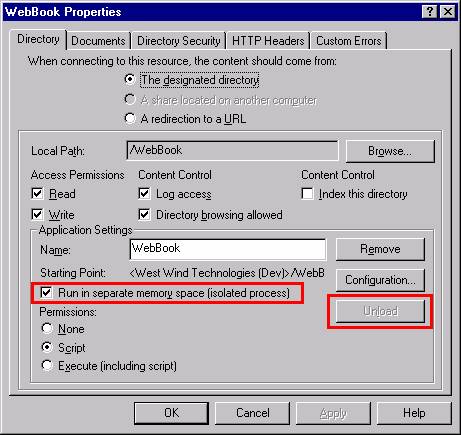
From this point on any request that uses this virtual directory and any directories below it belong to this application. Any ASP page loaded from there run in this 'protected' application in an MTS package (NT) or COM+ Application (Windows 2000) and load their COM objects into the MTS/COM+ process of this application rather than into the IIS process.
The benefit to all of this is:
¨ The virtual application cannot crash IIS because it's running in a separate process
¨ The virtual application can be unloaded separately from IIS
The latter can be accomplished by clicking on the Unload button in the dialog above. You can also unload the application from the MTS/COM+ Management console by selecting the virtual application and using the Unload option from there. The result is that only this application unloads and with it all those COM objects that may have been loaded of ASP pages from this virtual application!
This is fairly nice, but beware of
the following caveats with this approach:
¨
Virtual applications are slower than default
applications because there's overhead in the passthrough from IIS to the MTS/COM+
process.
¨ In online environments the Unload option is of very limited value because Unload does not guarantee that servers stay unloaded. As soon as somebody hits a page with a COM object the object once again becomes locked. On busy sites it would be next to impossible to update a component quickly enough. The only safe way to update components is to shut down the Web server!
Updating components – a kink in IIS applications
As you can see, the only reliable way to update components on IIS is by shutting down the Web server. This is a very serious issue if you think about it. Every time a code change is made you'll have to shut down the server to do this. Now think of the scenario of a big time E-Commerce site that's constantly busy – an update of a server could take a few minutes to get done right. You have to shut down the server (and you would not want to use KILL in this case!), then copy in your new component, re-register it (this may not be necessary, but to be safe you should), then restart the Web service. This is a lot of time and a large number of pissed off customers who get a message that the server is not available for even a few minutes.
Now think of a smaller application that is hosted at an ISP. The ISP has a hundred virtual directories and everytime somebody running a COM object wants to update their application the ISP has to do the job for them! Depending on the application the update may require a server shutdown. You think the ISP will willingly shut down their Web server of 100 or more clients just to update your COM object? Not happily anyway and not more than a few times…
I know of no workaround for this issue, although I've thought about this quite a bit in my own Web Connection framework, where remote code updates can unload objects, replace the server, then automatically restart as part of the Web interface. IIS is in desperate need of a similar mechanism – let's hope Microsoft figures this out at some point (and they have with ASP+ and .Net where objects are cached and can be replaced inline).
Security implications
COM objects are very susceptible to IIS's security environment. The primary reason for this is that a COM object loaded from an ASP page inherits IIS's security context, which typically is the anonymous Web user accessing the page. The Anonymous Web user account by default is named IUSR_MachineName where machine name is the name of your server (du-uh!). The account name is configurable in the IIS Management Console, but it's recommended that you leave the account set for compatibility reasons (some applications may rely on the IUSR_ account). If you're running in a virtual application that runs in an isolated memory space the user account for this application will be IWAM_ plus some unique ID which you can look up in the security properties of the site. Under Windows 2000 an additional user called IWAM_MachineName also exists for Pooled applications. Pooled application share a single COM+ application that runs out of process of IIS. This provides isolation but better performance than private applications.
What this is means is that your component is called under the IUSR_ or IWAM_ security context rather than under the Interactive User account which is what you use when you're logged on to the NT box (which in turn maps to your actual user account). IUSR_ is a very low security account that has next to no rights on the machine. All file access rights it possesses must be manually assigned! IIS does this automatically for any Web enabled directories, but for any other directories that may contain data or other support files you're responsible for configuring the file access rights!
In order to create a COM object and access data the IUSR_ or Everyone account must have at least the following rights:
¨ Read and Execute rights on the actual DLL server that is to be launched
¨ Full rights on any VFP data files to be accessed
You'll probably want to set these rights at the directory level. Notice that this is a potentially serious security risk as this gains the anonymous user access to your server's hard disk, given that the user knows where to look for the data. Read access is all that's needed to high-jack a file from the server! Be very careful with security!!!
To
demonstrate how the security works, add the following method to your server:
************************************************************************
* ASPTools :: GetUsername
*********************************
*** Function: returns the currently active username
************************************************************************
Function GetUserName
DECLARE Integer GetUserName ;
IN WIN32API AS GUserName ;
STRING @nBuffer, ;
INTEGER @nBufferSize
lcUserName = SPACE(255)
lnLength = LEN(lcUserName)
lnError = GUserName(@lcUserName,@lnLength)
RETURN SUBSTR(lcUserName, 1, lnLength - 1)
Then
create an ASP page that creates the server and accesses this method:
<% SET oServer = Server.CreateObject("ASPTools.ASPDemo") %>
<b>Current User name: </b> <%= oServer.GetUserName() %>
You'll
find that the username displays "IUSR_MachineName" (or
possibly "WAM_USR_APP1" or
something like that if you created a "separate application").
Now
try the following (this will work only if you're running NT with NTFS—make sure
you note the permissions on the file before changing them): Open Windows
Explorer, select the COMCounter.asp file and change the permissions on it, so
that only your user account has access to it. In my case I'll remove IUSR_,
Everyone and also Administrator (because my development IUSR_ account has admin
rights). So now only my current user account has access to this file. Rerun the
request.
Now when you try to access the page you'll be presented with a password dialog box asking for username and password. Type in your account info and look at the username returned by the ASP page: It's the username you logged in as in the password dialog—in my case rstrahl. Once you've tested this, make sure you reset the permission for IUSR_ and Everyone (if it was there before).
This
demonstrates how IIS passes down security to your COM object. The good news is
that the security of the ASP page determines how your server is accessed. The
bad news is that the security of the ASP page determines how your server is
accessed! Here's why it's a problem: Normally the IUSR_ account is meant to be
a low-impact, user account that has practically no rights other than to read
and execute Web pages and scripts on your site.
When your COM object gets called
from the Web, it usually will load under the IUSR_MachineName account, which by
default will not have rights to read and write data in your application path!
No files outside of the Web space can be accessed unless permissions are
changed!
Read
the previous sentence again, because it's very important! So how to get around
this nasty problem? There are several ways:
¨
Give directory access to the IUSR_ account.
Assign full access rights to the
IUSR_ account for every directory in which you'd expect to write data. This is
tedious and prone to many errors because the directory permissions must be
configured on every machine that you move files to. You also need to remember
that this may include the system TEMP path and the SYSTEM path in order to make
Windows API calls! It also opens up your system to serious security issues.
This option is not recommended.
¨
Give the IUSR_ account additional rights.
You can add the IUSR_ account to
the Administrator group, and all your COM objects will magically have access to
the system! Sure, but so will anybody else who accesses your system over the
Web. If they can find a way into a directory (via Web Mapping, or whatever) the
system is open to them. This may be a bad idea for a production system, but
it's probably the best way to work on your development system—just be sure to
test with the Admin rights off before you take your application online!
¨
Use Microsoft Transaction Server/COM+ for your
COM object.
MTS/COM+ allows you to configure a security role for your COM component, and by
running through MTS you're allowing MTS to manage the security context for you.
By doing so, you're changing the security only for the component—not the entire
Web site. This is a decent way to implement security, but it complicates both
installation and development of applications. Use this only as a deployment
solution.
¨
Impersonate a user account from within your COM
object.
NT supports a concept called user
impersonation, which allows you to temporarily change the user context to
another user and then reset it to the original. In fact, this is how IIS itself
handles user contexts such as IUSR_ that it passes to you. Setting user
accounts is complex and requires usernames and passwords, which is unsuitable
for generic applications. However, knowing how IIS creates user accounts can
help here: IIS is a service so it runs under the SYSTEM account, but it impersonates
the Web user to become whatever user is logged in. An API function called RevertToSelf()strips off all impersonations. When you do this to a Web request in your
COM object, the server reverts to the SYSTEM account, which typically does have
rights in most places on your system unless it was explicitly disabled.
The
most consistent mechanism is the last item above, so here's how to implement
it. Add the following to the top of the GetUserName method presented above:
Function GetUserName
LPARAMETER llForceToSystem
IF llForceToSystem AND "NT" $ OS()
DECLARE INTEGER RevertToSelf ;
IN WIN32API
RevertToSelf()
ENDIF
and
add the following to the COMCounter.asp page:
<b>Current User name: </b> <%= oServer.GetUserName() %>
<b>Current User name: </b> <%= oServer.GetUserName(True) %><br>
<b>Current User name: </b> <%= oServer.GetUserName() %>
When
you run this, I get:
Current User name: IUSR_RAS_NOTE
Current User name: SYSTEM
Current User name: SYSTEM
which
demonstrates that an anonymous user comes in as IUSR_RAS_NOTE, then the IIS
Impersonation is removed with RevertToSelf() and switches to SYSTEM. (Note: If
you're logged into the Web server somehow, like through VID debug mode, your user account might
show up instead of SYSTEM). The last call is in there to demonstrate that once
you've changed the user context it doesn't change back for each method call but
is scoped to the current page. There is no easy way to reset it back to IUSR_
unless you know the password. Generally this should not be a problem.
What
does this mean? Since IUSR_ is not supposed to have any rights, you can run
into problems with accessing data in paths where IUSR_ doesn't have rights.
When running your COM components, you can use RevertToSelf() to essentially
grant the user temporary rights while you're executing the current ASP page. So
once you've reverted to the SYSTEM or specific user account, the user has
rights to access the system as needed, be it for data or the registry or a
network resource. Once the page completes, the lax security is released and
reverts back to IUSR_ on the next access to the Web server.
Keep
in mind that the SYSTEM account is a local account and it has no network
rights. It most likely will not have access to remote machine drives across the
network. If that's required, you might have to set up a specific account to
impersonate and use it for remote access, or else use the Transaction Server
mechanism mentioned in the bullet list above.
Mechanisms of using COM objects
I've detoured a little here digging into ASP infrastructure that explains how things go wrong. The counter example above was a very simple example how you can use a COM component that provides specific data like a business object to an ASP page. You directly interface with the object from the ASP page and let the component do it's piece of work – in this case manage and increment the counter value.
There are three general ways that you can take advantage of objects in an ASP page:
¨
Using a COM
object as a business object
In this scenario you simply use the business logic in the COM object by
accessing properties and methods of the component. This is the most common use
of COM objects in general.
¨
Using a COM
object as an HTML generator
You can also use COM as a Web interface to Visual FoxPro with ASP. Rather
than having most of the code in the ASP and having the ASP code driving the COM
object, the ASP page is requesting the Fox code to perform some operation that
results in HTML output. For example it's possible to create an ASP page that
does only this:
<%
SET oServer = Server.CreateObject("ASPDemo.ASPTools")
Response.Write(
oServer.CreateHTML() )
%>
This would be all that's required from the ASP page if the
CreateHTML method returns a full HTML document. The same approach can be used
for creating portions of HTML pages, like data-driven tables or things like Fox
forms rendered as DHTML.
This can be very useful for taking advantage of VFP's strengths and superior
performance. Generating HTML in VFP can be drastically more efficient than
using ASP script code as well as providing features that would be impossible to
achieve in ASP altogether.
¨
Using the COM
object as an object factory
It's also possible to use a COM object to return another COM object, even one
that's not explicitly defined. In its simplest form you can do things like
retrieve a record in VFP then return that record to ASP as an object. You can
also create a business object that accesses data and contains other logic and
pass that back to ASP, allowing the ASP page to drive that business object that
was created on the fly in FoxPro code.
We've already seen an example of
the first scenario. Let's take a quick look at the HTML generating scenario. Physically this approach is no different from
using method calls and properties directly, but conceptually it's changing the
role of the VFP server into an HTML-generation tool in addition to processing
the business logic.
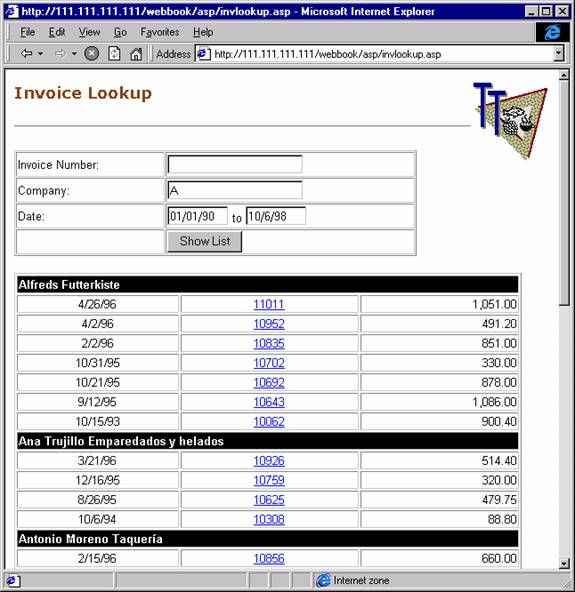
I'll
add a few more methods to the ASPTOOLS server now. The following code queries
some data from the TasTrade customer and invoice tables provided as sample data
with Visual FoxPro. Here's what the code looks like:
************************************************************************
* AspTools :: CustList
*********************************
*** Function: Retrieves customer list and creates an HTML Table from it
************************************************************************
FUNCTION Custlist
*** VFP Sample Data Path
lcDataPath = home(2)+"data\"
lcWhere = ""
IF !EMPTY(THIS.cCompany)
lcWhere = " AND Company = THIS.cCompany "
ENDIF
IF LEN(THIS.cInvNo) > 0
lcWhere = lcWhere + " AND orders.order_id = PADL('" +THIS.cInvNo + "',6) "
ENDIF
SELECT customer.company, customer.cust_id, orders.order_id,orders.order_date, Order_amt ;
FROM (lcDataPath + "Orders"), (lcDataPath + "Customer") ;
WHERE customer.cust_id = orders.cust_id &lcWhere ;
ORDER BY company,order_date DESC ;
INTO CURSOR TQuery
lcLastCustId = " "
lcOutput = ""
SCAN
lcOutput = lcOutput + ;
[<table border="0" width="570" class="bodytext">]
IF lcLastCustId <> Tquery.Cust_id
lcOutput = lcOutput + ;
[<tr><td bgcolor="#000000" colspan="3" width="564"><font face="Arial" color="#FFFFFF"><strong>] + Trim(Tquery.Company) +[</strong></font></td></tr>]+CHR(13)+CHR(10)
ENDIF
lcLastCustId = Tquery.Cust_Id
lcOutput = lcOutput + [<tr>]+;
[<td align="center" width="179">] + Transform(TQuery.Order_date) + [</td>] + ;
[<td align="center" width="198"><a href="Invoice.asp?Orderid=]+TQuery.Order_id+[">]+Tquery.Order_id+[</a> </td>]+;
[<td align="Right" width="175">]+ Transform(order_amt) + [</td>]+;
[</tr></table>] + CHR(13)+CHR(10)
ENDSCAN
USE IN TQuery
RETURN lcOutput
This
code looks at several input properties to determine the values of the submitted
values from the ASP page, which looks like this (truncated for size):
<%
Set oServer = Server.CreateObject("aspdemos.asptools")
lcCompany = Request("txtCompany")
lcInvNo = Request("txtInvoiceNo")
lcFromdate= Request("txtFromDate")
lcToDate = Request("txtToDate")
llFirstHit = False
IF LEN(lcToDate)=0 and LEN(lcFromDate)=0 then
llFirstHit = True
lcFromDate = "01/01/90"
lcToDate = FormatDateTime(now,vbShortDate)
END If
%>
<form action="COMinvlookup.asp" method="POST">
<table border="1" cellPadding="1" cellSpacing="1" width="75%" class="bodytext">
<tr>
<td>Invoice Number: </td>
<td><input id="txtInvoiceNo" name="txtInvoiceNo" size="20" value="<%= lcInvNo %>"></td>
</tr>
<tr>
<td>Company: </td>
<td><input id="txtCompany" name="txtCompany" size="20" value="<%= lcCompany %>"></td>
</tr>
<tr>
<td>Date:</td>
<td><input id="txtFromDate" name="txtFromDate" size="8" value="<%= lcFromDate %>"> to <input id="txtCompany" name="txtToDate" size="8" value="<%= lcToDate %>"></td>
</tr>
<tr>
<td> </td>
<td><input type="submit" value="Show List" name="btnSubmit"></td>
</tr>
</table>
</form>
<% oServer.cCompany = lcCompany
oServer.cInvNo = lcInvNo
oServer.CFROMDATE = lcFromDate
oServer.CTODATE = lcToDate
%>
<%= oServer.CustList() %>
The
form acts as both an input and output form. The difference here is that Visual
FoxPro is used to do all data access, as well as providing the majority of the
HTML generation for the table list below. The key code is in the last five
lines of the ASP page, which populates the query properties and then calls the
Custlist() method to render the HTML, which is returned as a string.
You
might be telling yourself, "This is some ugly code," since it's
generating HTML manually via code. It might not be very easy to type this
stuff, but it's actually very fast and efficient code compared to scripted ASP
code. For one thing there's no COM access involved here for each field access –
a lot of overhead is involved in making COM calls for every data access of ADO
recordsets. For large tables you may see a 10 times or better performance
increase.
In
addition, once you start using VFP for HTML generation you'll quickly take to
creating some base classes that can create HTML automatically for many tasks. I
don't want to get into this too much further here—but it's relatively trivial
to generate generic HTML from a Fox table with 30 or so lines of code:
************************************************************************
* ASPTools :: ShowCursor
*********************************
*** Function: Renders the current select cursor/table as HTML.
*** Pass: llNoOutput - If .T. returns a string. Otherwise
*** sends directly to output.
*** Return: "" or output if llNooutput = .t.
************************************************************************
FUNCTION ShowCursor
LPARAMETER llNoOutput
LOCAL lcOutput, lnFields, lcFieldname,x
lcOutput = ;
[<TABLE BGCOLOR="#EEEEEE" Width="98%" ALIGN="CENTER" Border=1>]+CR
IF EMPTY(ALIAS())
RETURN ""
ENDIF
lnFields = AFIELDS(laFields)
*** Build the header first
lcOutput = lcOutput + "<tr>"
FOR x=1 to lnFields
lcfieldname=Proper(lafields[x,1])
lcOutput = lcOutput + "<th BGCOLOR=#FFFFCC>"+lcFieldName+"</th>"
ENDFOR
lcOutput = lcOutput + "</td></tr>"
SCAN
lcOutput = lcOutput + "<TR>"
*** Just loop through fields and display
FOR x=1 to lnFields
lcfieldtype=lafields[x,2]
lcfieldname=lafields[x,1]
lvValue=EVAL(lcfieldname)
DO CASE
CASE lcFieldType = "M"
lcOutput = lcOutput + "<TD>" + STRTRAN(lvValue,CHR(13),"<BR>") + "</TD>"
OTHERWISE
lcOutput = lcOutput + "<TD>" + TRANSFORM(lvValue) + "</TD>"
ENDCASE
ENDFOR && x=1 to lnFieldCount
lcOutput = lcOutput + "</TR>" + CR
ENDSCAN
RETURN lcOutput
ENDFUNC
The
order list in the example above can get very long—the VFP demo data contains
more than 1000 records. One problem that you run into is how to display all
that data at once. Surprisingly, getting the data and generating HTML is
relatively fast—what's really slow is the table rendering inside the browser. HTML tables in IE don't display until
all data for that table has been retrieved, including the final </table>
tag. This means the entire set of data needs to download and then IE must
recalculate the table widths and render it. When you run the ASP table, you'll
find that the table is not available for 10 to 20 seconds (on my P200
notebook).
To
speed things up, there's a little trick you can use: Rather than rendering the
entire output as one huge table, the Fox code above creates each row as its own
table. The tables stack on top of each other, and if you remove the borders
from the tables you can't tell the difference. Now the table starts rendering
immediately as soon as any data is returned, even while it's downloading the
remainder of the data. The apparent performance of the INVLookup.asp page and the COMINVLookup.asp are like night
and day. Note that you can do the same thing to the ASP-only code as well. But
even then the VPF code performs notably better than the scripted ASP page.
Besides
performance, you get the advantage of the flexibility of VFP code. If you need
to perform complex conditional logic or run a lot of separate queries and
subqueries, creating HTML in Visual FoxPro may be a smart solution. On the
downside VFP HTML generation means that you have to recompile your server in
order to change the visual aspects of the generated code.
Using ASP
objects with your VFP COM server
When
building Web applications, it's vitally important to have access to the input
that the Web server makes available. With ASP this is accomplished using the
Request and Response objects for input and output. Because these components are
COM objects they can also be passed into your Visual FoxPro Automation servers
as parameters. We've already seen how to pass plain parameters to your VFP COM
objects, but COM also makes it possible to pass another COM object as a
parameter. This makes it much more convenient to pass information to Visual
FoxPro. Rather than passing 50 parameters of an insurance submission form, you
can pass a single object containing the request information. For example, to
pass the Request object to your VFP server you can simply do this:
<% Set oServer = Server.CreateObject("ASPDemos.ASPTools")
oServer.ProcessRequest(Request)
%>
Sounds
simple enough—I pass the single, compound Request object to Visual FoxPro and
then use VFP to pull the request information from the object itself. There's a
rub, however: VBScript's concept of default methods and properties is not
supported by Visual FoxPro, so the following code does not work in Visual
FoxPro as it does in VBScript:
* VFPClass::ProcessRequest
FUNCTION ProcessRequest
LPARAMETER loRequest, loResponse
lcLast = loRequest("Last")
ENDFUNC
This
code does
not work as is! It results in an error because VFP does not recognize
loRequest() as an object, but rather thinks it's a function. The key to making
this work is to understand how the object model works without the VBScript
defaults. If you take out all the default property and method calls (you can
look those up in an Object browser like the VB Object browser or the Vstudio
OleViewer application), you come up with the following:
loRequest.Form("Last").Item()
This
looks kind of funky, but it's the right way to access the Form object and one
of its collection values. The Form collection is the default property for the
Request object, and the Item() method is the default method for the Form
collection, which makes Request("FormVar") work in VBScript. In
Visual FoxPro you always need to use the longhand to make this work. Knowing
this, you can now access all of the other Request object collections, although
each of them has a slightly different implementation object model (consistency
has never been one of Microsoft's strengths).
A
call to the object from the ASP page to pass down the common objects looks like
this:
<%= oServer.ProcessRequest(Request,Response,Session) %>
You
can handle accessing these objects in your VFP code like this:
* VFPClass::ProcessRequest
FUNCTION ProcessRequest
LPARAMETER loRequest, loResponse, loSession
lcLast = loRequest.Form("Last").Item()
lcBrowser = loRequest.ServerVariables("HTTP_USER_AGENT").Item()
lcParameter = loRequest.QueryString("UserId").Item()
lcSessionValue = loSession.Value("TestVar")
loSession.Value("TestVar") = "New Value"
loResponse.Write("Your last name is: " + lcLast + "<BR>"+;
"The browser you use is: " + lcBrowser
Return .T.
Slick!
As you can see, the various Request collections like ServerVariables, Form and
QueryString all use the same syntax for accessing the item values with the
Item() method. I also decided to pass the Response object to the VFP object to
write output directly to the ASP output stream, rather than passing the result
back to the ASP page as a string. Using the Response object directly can be
more efficient when creating large amounts of text in some situations, as well
as allowing your code to send intermediate output to the HTML stream, rather
than buffering output until generation is complete. By doing so you can
essentially create an entire HTML page with this complete ASP page:
<% Set oServer = Server.CreateObject("ASPDemos.ASPTools")
Response.Write(oServer.ProcessRequest(Request,Response,Session) )
%>
I
also pass a Session object—you can use its Value() method to retrieve and set
any session values that you stored in an object. The same goes for the ASP
Application object. Notice the inconsistency here with a Value() method rather
than an Item().
The
Response object is a little easier to deal with. All you have to do is call the
Write method to send output directly into the ASP output stream. Note that it's
much more efficient to write to the Response object once with a single large
string rather than sending a lot of small strings in a loop, since each call to
the Response object is a COM method call.
The
IScriptingContext interface
You've
now seen how to access the Request and Response objects by passing parameters
to a COM object method. There is another way to make these two objects, as well
as ASP's Session, Application and Server objects, available to your servers
automatically.
Automation
servers called from an ASP page can choose to implement the IScriptingContext
interface that consists of two methods: OnStartPage() and OnEndPage(). The
OnStartPage() method receives a single object parameter: oScriptingContext.
This object is nothing more than a container that can provide object references
to all of the built-in ASP objects. This is quite useful to generically capture
the scripting context and store it to a property of your Automation server so
it's automatically available for each request:
DEFINE CLASS MyASPServer AS CUSTOM OLEPUBLIC
oScriptingContext = .NULL.
FUNCTION OnStartPage
LPARAMETER loScriptingContext
THIS.oScriptingContext = loScriptingContext
ENDFUNC
Function EchoBrowser
loRequest = THIS.oScriptingContext.Request
loResponse = THIS.oScriptingContext.Response
lcBrowser = LoRequest.ServerVariables("HTTP_USER_AGENT").item()
loResponse.Write(lcBrowser)
RETURN
ENDDEFINE
This
interface's main purpose is to give you hooks at the beginning and end of a
page to perform cleanups and to make it easier to get access to the various
objects that ASP exposes. Keep in mind, though, that you cannot use any of the
client object's methods in the OnStartPage() and OnEndPage() "events"
because they're not properly initialized in these methods. All access to these
objects must occur only in your actual request methods, such as EchoBrowser()
in the class above.
The main use of this interface is that it you don't have to pass the various ASP intrinsic objects down from the ASP page to keep your parameter interface clean.
ObjectContext Object
In the latest versions of IIS Microsoft recommends that you don't use the IScriptingContext interface and instead use the ObjectContext object which provides the same functionality, minus the OnStartPage/OnEndPage events. To use this interface instead use code like the following to retrieve any of the Intrinsic objects of IIS:
oMTS = CreateObject("MTxAS.AppServer.1")
oContext = oMTS.GetObjectContext()
Response = oContext.Item("Response")
Request = oContext.Item("Request")
Session = oContext.Item("Session")
Server = oContext.Item("Server")
Response.Write("<hr>Hello From VFP<hr>")
To get similar functionality as with the IScriptingContext interface you can call this code in the Init of the class and then assign the oScriptingContext property to the oContext object retrieved for easy access. It's important to understand that this interface works only if you're running your Web Application (virtual or root) in Medium or High isolation modes that run through the COM+ manager. If you run in Low Isolation mode GetObjectContext() will fail.
Note that functionally there's little difference between these two interfaces in classic ASP. However in ASP.NET I've not been able to get the IScriptingContext interface to work, while the ObjectContext object access works fine as long as the ASPCOMPAT page directive is set to force IIS to create the objects.
Passing object back from VFP
It's
easy to pass objects to your Visual FoxPro server, but it also works the other
way around: You can create objects in Visual FoxPro and pass them back to an
ASP page.
Here's
a simple example of a VFP method that retrieves a record from a table, uses
SCATTER NAME MEMO to create an object from the record, and passes it back to
ASP:
*******************************************************
* ASPTools :: GetCustObject
*********************************
*** Function: Retrieves customer and returns an object
*** Pass: lcCustId - Cust ID No (no left padding)
*** Return: loCustomer - Customer Object
*******************************************************
FUNCTION GetCustObject
LPARAMETERS lcCustId
IF !USED("TT_Cust")
USE (THIS.cAppStartPath + "data\TT_Cust") IN 0
ENDIF
SELECT TT_Cust
LOCATE FOR CustNo = PADL(lcCustId,8)
IF FOUND()
SCATTER NAME loCustomer MEMO
RETURN loCustomer
ENDIF
SCATTER NAME loCustomer MEMO BLANK
RETURN loCustomer
* WebTools :: GetCustObject
Isn't
that cool? Any object you create from within Visual FoxPro is automatically
turned into a COM-compatible object that's marshaled back to the calling COM
client—ASP in this case. Inside your ASP page you can now simply use that
object:
<%
lcCustNo = Request.QueryString("CustNo")
'*** Instantiate VFP Object
SET oServer = Server.CREATEOBJECT("aspdemos.asptools")
'*** Retrieve Customer Object
SET loCustomer = oServer.GetCustObject( (lcCustNo) )
%>
<PRE>
Company: <%= loCustomer.Company %>
Name : <%= loCustomer.CareOf %>
Phone : <%= loCustomer.Phone %>
</PRE>
Objects
can be nested, so you can create a VFP object that contains other member
objects, and you can reference those objects and its methods from ASP as well.
Powerful, don't you think?
Example—an
object-based customer browser
Let's
look at a simple example that allows browsing, editing and adding to a customer
list—all using a single ASP page and three separate methods of a VFP Automation
Server. The figure belowshows the simple form.

Everything
happens on a single ASP page, which can run in three modes: Default View,
Customer View or Save Mode. Customer View occurs when you click on a company
hot link, which retrieves the customer information and fills the individual
fields above the list with the customer values. Saving occurs when you click
the Save button, which causes the ASP page to run with a Querystring of
ASPObjects.asp?Action=Save. The Save flag is used by the page to decide whether
to update or add a new object.
The
ASP page acts as the "navigator" that simply controls the VFP
back-end object. Here's the ASP/HTML code:
<html><head>
<title>Active Server Objects to VFP</title>
</head><body>
<%
Set oServer = Server.CREATEOBJECT("aspdemos.asptools")
lcAction = Request.QueryString("Action")
lcCustno = Request.QueryString("Custno")
If lcAction = "Save" Then
Set loCustomer = oServer.SaveCustomer(Request, Response, Session)
lcCustno = loCustomer.Custno
Else
Set loCustomer = oServer.GetCustObject( (lcCustNo) )
End If
%>
<form method="POST" action="aspObjects.asp?Action=Save">
<input type="hidden" name="CustNo" value="<%= lcCustNo%>"><table border="0" width="72%">
<tr>
<td width="16%" align="right"><strong>Company:</strong></td>
<td width="84%"><input type="text" name="txtCompany" size="45" value="<%=loCustomer.Company%>"></td>
</tr>
…remaining fields omitted for space
</table>
</form>
<%
Response.Write( oServer.HTMLCustList() )
%>
</body></html>
Notice
the retrieval of the "Action" form variable, which is responsible for
routing calls to the appropriate server method. There's also a hidden CustNo
form variable that lets the server know which customer to save when the user
clicks the Save button. Although the form variable is hidden, it does appear in
the Request object.
Here
are the three Visual FoxPro methods in the VFP COM object:
************************************************************************
* AspTools :: GetCustObject
*********************************
*** Function: Retrieves a customer and returns an object ref to it
*** Pass: lcCustId - Customer ID (may not be Left padded)
*** Return: loCustomer - Customer Object
************************************************************************
FUNCTION GetCustObject
LPARAMETERS lcCustId
IF !USED("TT_Cust")
USE (THIS.cAppStartPath +"data\TT_Cust") IN 0
ENDIF
SELECT TT_Cust
LOCATE FOR CustNo = PADL(lcCustId,8)
IF FOUND()
SCATTER NAME loCustomer MEMO
RETURN loCustomer
ENDIF
SCATTER NAME loCustomer MEMO BLANK
RETURN loCustomer
ENDFUNC
* ASPTools :: GetCustObject
************************************************************************
* ASPTools :: SaveCustomer
*********************************
*** Function: Saves a customer based on a CustId and returns an object
*** ref to the customer.
*** Pass: ASP Request Object
*** Return: loCustomer object
************************************************************************
FUNCTION SaveCustomer
LPARAMETERS loRequest, loResponse, loSession
lcCustno = loRequest.Form("CustNo").item()
lcCompany = loRequest.Form("txtCompany").item()
lcName = loRequest.Form("txtCareOf").item()
lcPhone = loRequest.Form("txtPhone").item()
lcEmail = loRequest.Form("txtEmail").item()
IF !EMPTY(lcCustNo)
UPDATE (THIS.cAppStartPath + "data\tt_cust") ;
SET Company = lcCompany,CareOf = lcName, Phone = lcPhone, Email = lcEmail ;
WHERE CustNo = PADL(lcCustno,8)
ELSE
INSERT INTO (THIS.cAppStartPath + "data\tt_cust") ;
(Company, CareOf, Phone, Email,CustNo) VALUES ;
(lcCompany, lcName, lcPhone, lcEmail, SYS(3))
ENDIF
SELECT TT_Cust
LOCATE FOR Custno = PADL(lcCustno,8)
lcOutput = "<b>" + TRIM(Company) + " has been saved...</b><br>"
loResponse.Write(lcOutput)
SCATTER NAME loCustomer MEMO
RETURN loCustomer
ENDFUNC
* WebTools :: SaveCustList
************************************************************************
* ASPTools :: HTMLCustList
*********************************
*** Function: Test Method that retrieves a customer list based on
*** a name passed.
*** Pass: lcCompany - Name of the company to look up
*** Return: HTML of the list
************************************************************************
FUNCTION HTMLCustList
LPARAMETERS lcName
lcName = IIF(type("lcName") = "C", UPPER(lcName), "")
*** Run Query - Note I'm creating the Hotlink right in the query
*** to be able to use the ShowCursor method to display the
*** cursor with a single command!
SELECT [<A HREF="ASPObjects.ASP?CustNo=]+URLEncode(tt_cust.custno)+[">]+tt_cust.company+[</a>] as Company,;
careof as Contact, Phone ;
FROM (THIS.cAppStartPath + "data\TT_CUST") ;
WHERE UPPER(tt_cust.company)=TRIM(lcName) ;
INTO CURSOR TQUERY ;
ORDER BY company
*** Stolen from wwFoxisapi
RETURN THIS.ShowCursor()
ENDFUNC
* HTMLCustList
Notice
how little code is involved in making this work, and how the HTML display logic
and the business logic has been, for the most part, separated: The ASP page has
the HTML display logic and the VFP COM object has the business rules.
Compare
this version of HTMLCustList with the version used in the previous section
where the HTML was built by hand. Here I use a generic method called
ShowCursor() described above, which can render any cursor as an HTML table with
this single line of code. Methods like this can make very short work of
creating results.
The
key concept to walk away with from this exercise is that it's easy to have
Visual FoxPro and Active Server Pages communicate with each other using
business objects that you can create or may have already created with Visual
FoxPro.
Binary Data
from VFP COM objects
Sometimes
it's very handy to return binary data output from an HTTP request. There are
many situations when binary data is appropriate. Here are a few examples:
¨
Returning data
files in their native formats such as DBF files
¨
Returning documents
in their native formats such as Word docs
¨
Returning images
from a database
¨
Generating a PDF
document on the fly and returning it
Each
of these scenarios returns output other than HTML to the client. HTTP makes it
possible to return any kind of data although the most common use certainly has
been HTML output.
Active
Server Pages supports sending binary output to the Web server by using the the
Response.BinaryWrite() method. Typically output written by ASP is written using
double byte character sets which are native to COM. When you simply use the
Write Method to output binary data you actually get the original text as
Unicode output sent back to the server. Write will also stop output when it
encounters a NULL (CHR(0)) character in the output stream. This will obviously
break any binary data that you may want to send. The BinaryWrite method gets
around these issues by marking the input string value for binary representation
(a COM ByteArray to be exact) and the data is sent unaltered instead of being
run through the COM string conversions first.
So
far, so good. Unfortunately, this doesn't work directly with VFP data. The
problem is that COM servers created with VFP don't support explicit types – all
return values from a method call are treated as a Variant type. When an ASP
page retrieves this Variant it has to convert that Variant into a string first
at which time any binary data is again converted to Unicode first.
So
the following will not work:
Function VFPReturnBinary
*** Get a reference to the Response Object
Response = THIS.oScriptingContext.Response()
LcBinaryData = "This is a test" + CHR(0) + "More text…"
*** Now write out the data – doesn't work correctly
Response.BinaryWrite(lcBinaryData)
RETURN
If
you were to call this request from an ASP page like this:
<% Set oServer = Server.CreateObject("aspdemos.asptools")
oServer.VFPReturnBinary() ' This method creates its own output
%>
you'd
see:
T”h”i”s” ”i”s” ”a” ”T”e”s”t”
The
square characters are the second Unicode character (0 in this case). Notice
also that the string is truncated at the NULL rather than including the entire
value.
The
same will occur if you RETURN the binary string and use the ASP page to display
it:
RETURN lcBinaryData
And
then use:
<%= oServer.BinaryWrite( oServer.VFPReturnBinary ) %>
The
same logic applies here: The data from the VFP server is returned as a Variant
and then converted back into a Unicode string which fails with the same
results.
So
how can we return true binary data from a VFP COM Server? The answer lies in a
little known function in VFP called CreateBinary.
CreateBinary creates a COM compatible ByteArray Variant that can be passed back
to ASP and used as raw binary data. To make the example above work change the
following line to:
Response.BinaryWrite( CreateBinary(lcBinaryData) )
And
voila binary data output is available.
Quick
example. Let's say you have a VFP client application that needs to retrieve
some data from your Web server. How about code like this:
FUNCTION ReturnBinaryData
Request = THIS.oScriptingContext.Request()
Response = THIS.oScriptingContext.Response()
lcCompany = UPPER(Request.Form("Company").item())
IF EMPTY(lcCompany)
lcCompany = UPPER(Request.QueryString("Company").item())
ENDIF
lcWhere = Request.QueryString("SQL").item()
IF !EMPTY(lcWhere)
lcWhere = " AND " + lcWhere
ENDIF
lcFile = ADDBS(SYS(2023)) + SYS(2015)
SELECT Company, CareOf, CustNo ;
FROM TT_Cust ;
WHERE UPPER(Company) = lcCompany &lcWhere ;
ORDER BY Company ;
INTO DBF (lcFile)
USE
lcFileStr = FILETOSTR(ForceExt(lcFile,"dbf"))
Response.Write( TRANSF(len(lcFileStr)))
ERASE (ForceExt(lcFile,"dbf"))
RETURN CreateBinary(lcFileStr)
ENDFUNC
This code runs a query to a VFP table, then wraps up the table into a binary string by simply reading it with FILETOSTR. The wrapped up file is then sent out over HTTP to the VFP client which may use code like this (using the wwIPStuff library):
oIP = Create("wwIPStuff")
lcFileData = oIp.HTTPGet("http://localhost/asp/aspbinarydemo.asp")
lcFile = SYS(2015)+'.dbf'
STRTOFILE(lcFileData,lcFile)
USE (lcFile)
BROWSE
ERASE (lcFile)
Note that this is a very simplified example. If your file contains data from a memo field you obviously have to work a little harder to get the data packaged since memo fields require a second file (DBF/FPT). My Distributed Internet Applications article describes how to efficiently package data for transfer over the Web.
Sharing data
with ASP—passing ADO objects
In
addition to the powerful functionality of passing generic objects back and
forth, you can also pass data directly by using Active Data Objects! To
demonstrate, I'll show an example that accesses a SQL Server database and
passes the data to your VFP server. You can, of course, do this directly from
ASP using ADO and then looping through the recordset or using action operation
to update the data directly from ASP code.
Let's
do something a little different—open the SQL Server Pubs Author table as a
cursor instead, pass it to the VFP Active Server Component and add a record to
it within the VFP code. To do this, set up a System DSN to the SQL Server Pubs
database and name it Pubs. You might also have to set up some additional
default values for the Authors table in order to allow inserts with only a few
fields filled in, as I did in the figure below.

Here's
the ASP code to open the Authors table as a cursor (note that some of the
constants defined in the ADO documentation don't work, so the literal values
must be used):
<form method="POST" id=form1 name=form1>
<Table>
<TR><TD>Last Name:</td><td> <INPUT type="text" name="txtLName"></td></tr>
<TR><TD>First Name:</td><td> <INPUT type="text" name="txtFName"></td></tr>
<TR><TD>Phone Number:</td><td> <INPUT type="text" name="txtPhone"></td></tr>
<TR><TD>SSN #:</td><td> <INPUT TYPE="Text" name="txtSSN"></td></tr>
<TR><TD><INPUT type="submit" value="Add" name=btnSubmit></td><td> </td></tr>
</table>
</form>
<hr>
<%
Set oServer = Server.CREATEOBJECT("aspdemos.asptools")
Set Conn = Server.CreateObject("ADODB.Connection")
Conn.Open("dsn=pubs;uid=sa;pwd=")
Set rs = Server.CreateObject("ADODB.Recordset")
rs.CursorType = adOpenKeyset
rs.LockType = 2 ' adLockOptimistic
rs.Open "authors", conn , , , 2 'adCmdTable
If Len(Request("txtLName")) > 0 Then
oserver.AddAdoRecord rs,Request
rs.Update
End If
rs.Movefirst
%>
Here's a list of records:<p>
'*** Display the record set from inside of VFP
<%= oServer.ShowAdoRS( rs ) %>
Inside
Visual FoxPro, you can now do several things. First take a look at the code
that displays the recordset at the end:
FUNCTION ShowAdoRs
LPARAMETER rs
lcOutput = "<table border=1 bgcolor=#eeeeee width=80% >"
do while !rs.eof
lcOutput = lcOutput + "<TR><TD>" + ;
rs.fields("au_lname").value + "</td><td>" + ;
rs.fields("au_fname").value + "</td><td>" + ;
rs.Fields("phone").value + "</td></tr><BR>"
rs.movenext()
ENDDO
lcOutput = lcOutput + "</table>"
RETURN lcOutput
ENDFUNC
This
is probably not a good use of a VFP object, since you could run it more
efficiently inside the ASP code as described in the last example. However, it
demonstrates how you can access ADO object properties inside your VFP
component. Like the Request object, the Recordset object has many default
properties; in order to get at the collection values, use the Value property to
retrieve the actual field name like this:
rs.fields("UserId").value
To
update the cursor created in the ASP page, use the AddAdoRecord method:
PROCEDURE AddAdoRecord
LPARAMETER rs, Request
rs.AddNew
rs.Fields("au_lname").value = Request.Form("txtLName").item()
rs.Fields("au_Fname").value = Request.Form("txtFName").item()
rs.Fields("phone").value = Request.Form("txtPhone").item()
rs.Fields("au_id").value = Request.Form("txtSSN").item()
rs.Fields("zip").value = "97031" 'Lazy but required for constraints
rs.Fields("state").value = "OR"
rs.Update
RETURN
This
simple method adds a new record and populates the fields. Note the use of the
Request object to retrieve the previous link that led to the current link. (If
you try this on your own, this value will be blank unless you arrived at the
test page from a link.) This is probably not a good use of passing a recordset
because nothing useful really happens in this request—you could just as easily
do this without the COM method call from the ASP page. But you could, of
course, run extensive Visual FoxPro code prior to actually inserting the record
into the ADO result set, which is where the power comes in. You could run your
own query against local VFP data and then update the ADO cursor for return to
the ASP page, which might do something further with the data. Or you could run
a query in the ASP page to prepare the data and then pass it to Visual FoxPro
to properly format certain columns of the result. It's easy to do by accessing
the ADO object directly.
An objective
warning
Using
objects is a great way to pass data between VFP and ASP, but keep in mind that
passing this data and accessing the individual object properties takes place
over COM, which provides the communication infrastructure between ASP and VFP.
For this reason, reading properties and calling methods in your COM object is
relatively slow and imposes serious scalability issues. Repeatedly creating
objects in a loop and retrieving properties from that object in each iteration—only
to send them to output with the Response object—might not be the most efficient
approach. For example, your ASP page may do this:
<%
oServer.RunQuery() ' creates a VFP cursor
do while oServer.GetNext() ' retrieve the next rec and store to object
Last name: <%= oServer.oRecord.LastName %>
Company: <%= oServer.oRecord.FirstName %>
<% loop %>
This
code will run perfectly well, but because each GetNext()call and each property
access occurs over COM, there's significant overhead (as well as potential
blocking issues I'll discuss later). When using objects and COM, you should try
to minimize the number of round trips made between the ASP page and your
server. In this scenario it might just be easier to have VFP run the query,
execute the loop and generate the HTML internally, and then pass back a string
that gets embedded:
<%= oServer.ShowCustList() %>
In
iterative situations, using the Response object directly in your VFP methods or
passing back a complete string with the result output from VFP can be vastly
more efficient than constantly creating and deleting objects over COM. Weigh
convenience versus performance, and test different scenarios if you feel your
request is slow.
Keep
in mind that there are a number of options available to accomplish the same
job, and performance between approaches can vary considerably. With COM in
particular, the performance rules aren't always cut and dried—what works well
in one request may perform horribly in another.
Understanding
ASP/COM scalability
As
you've just seen, it's easy to extend ASP with your own Visual FoxPro COM
objects. When you're testing you'll see that your server code performance is
very fast—operations run at native Visual FoxPro speed, so data access in
particular is fast; it's noticeably faster, in fact, than using ADO with the
Visual FoxPro ODBC driver for similar requests. Also, looping and string
operations in VFP are vastly faster than they are in script code. The
performance gain from using a COM object are very obvious by comparison.
What is
Apartment Model Threading and why should you care?
Apartment
model threading works by allowing multiple, simultaneous instances of your
component to be created on separate threads. The operation is transparent and
the logistics for the threading model are built into the Windows COM subsystem,
with Visual FoxPro 6.0 complying to the apartment-thread model. Although COM
makes it possible through this mechanism to run your COM servers as
multi-threaded objects that can operate simultaneously, your program has little
control over the multi-threading environment. In other words, the system
controls the threading model and your application behaves just as a stand-alone
application running in a multi-user environment. Apartment model threading
provides a simulation of multi-threading, but does not really make an application
truly multi-threaded and reentrant at the binary level as a C++ program.
Note:
Apartment Model threading is fully supported only with VFP 6.0 SP3 and later.
If you're building ASP COM components make sure you install SP3 and always
build your COM components to the MTDLL runtime (using the BUILD MTDLL command).
To
take advantage of apartment model threading, simply create an in-process
component (build a COM multi-threaded DLL in the Project Manager, making sure
each OLEPUBLIC class is marked for multi-use operation!) and then instantiate
your component via CreateObject() or an equivalent function call from any
COM-compliant client. If the client is multi-threaded it can take advantage of
the scheduling magic that COM performs to allow your server to be called on
multiple, simultaneously operating threads. In the case of Active Server Pages,
the client is IIS using an ASP page that has created an object reference of
your component via the Server.CreateObject() method.
Regardless
of how you create your object, Active Server invokes your object on a specific
thread and guarantees that it's always called on the same thread or in
Microsoftspeak, "the same apartment." Actually, this is not a
function of the Active Server client, but of the COM subsystem in Windows that
handles the logistics of marshaling requests on your component to the
appropriate thread if necessary. If the thread calling your component is
already the correct thread, no marshaling takes place. If you create and
destroy your object on each page, then marshaling is not an issue, but if you
use objects with Session and Application scope, these objects potentially
require marshaling. Keep in mind that if you use an application-scope object, a
single instance of that object is shared by all simultaneous pages. There's no
marshaling in that scenario, but also no multi-threading of any sort. For this
reason you should think carefully about whether you really need to implement
Application objects – they are very inefficient unless you build a C++ component
that can run in the Multi-threaded Apartment (MTA) model.
It's
important to understand that apartment model threading is only available to
DLL/in-process COM objects; EXE/out-of-process servers will suffer the same
blocking issues as before with serious performance limitations on the server's
COM subsystem. Note also that in-process DLL servers in Visual FoxPro 6.0 can
no longer have any user interface—this means no forms, no message boxes, and no
error dialogs. Even WAIT WINDOW and INKEY() are disallowed! All access to the
UI will generate a VFP exception in your COM server. (You can still
"run" forms in VFP without generating an error, but the UI is
invisible. It's equivalent of DO FORM NOSHOW.)
Okay,
that all sounds good, but there's a problem in the initial release of Visual
FoxPro 6.0. Unlike VFP 5.0, version 6.0 does
support apartment model threading, but it blocks
access to the same server while another call to that same server is executing.
The server is blocked at the component level, which means that the component
starts up on a new thread, but has to wait for a blocking lock to clear before
it can enter the processing code. This means that if two requests are hitting
the page that uses the same COM server (not object, but server—each server can
contain multiple objects) the requests will queue. If you have a 10-second
request and a 1-second request following it, the 1-second request may have to
wait up to 11 seconds to get its result returned. That's very limiting for an
Active Server Page on a busy Web server with perhaps hundreds of simultaneous
users! This problem has been addressed in SP3 with the multi-threaded runtime
and the BUILD MTDLL command (Build Multithreaded DLL from the Project Manager).
SP3
and later provides a new multi-threaded runtime that handles thread isolation and
does not block simultaneous method calls and it's possible to get unlimited
instances of your server to fire up simultaneously. The figure below shows six
instances of a component processing simulated slow requests simultaneously. The
thread IDs and completion times clearly show that requests run simultaneously.

Here's
what the code looks like. Add another method to the ASPTools object called
SlowHit, which allows you to force a request to take a certain amount of time:
************************************************************************
* ASPTools :: SlowHit
*********************************
*** Function: Allows you to simulate a long request. Pass number of
*** seconds. Used to demonstrate blocking issues with
*** VFP COM objects.
************************************************************************
FUNCTION SlowHit
LPARAMETER lnSecs
LOCAL x
lnSecs = IIF(EMPTY(lnSecs), 0, lnSecs)
DECLARE Sleep IN WIN32API INTEGER
FOR x = 1 to lnSecs
FOR x = 1 to lnSecs
Sleep(1000)
ENDFOR
ENDFOR
DECLARE INTEGER GetCurrentThreadId IN WIN32API
RETURN GetCurrentThreadId() && "waited for " + TRANSFORM(lnSecs) + "..."
Note that you can't use WAIT WINDOW, INKEY or DOEVENTS because these are UI operations that are not allowed in a DLL server. I use the Sleep API to wait without hogging all of the system's CPU in a tight loop.
To exercise this method, create an ASP page called Slowhit.asp:
<%
lnSecs = Request("txtSeconds")
IF LEN(lnSecs) < 1 then
lnSecs = "3"
End If
lnSecs = CLng(lnSecs)
Set oServer = Server.CreateObject("AspDemos.AspTools")
Response.Write( "<b>Thread Id</b>: " & oServer.SlowHit((lnSecs)) & "<br>")
Response.Write( "<b>Current Time:</b>" & FormatDateTime(now,vbLongTime))
%>
<hr>
<form method="POST" action="Slowhit.asp">
Waited for <INPUT type="text" name=txtSeconds size="3" value="<%= lnSecs %>"> seconds
<INPUT type="submit" value="Run again"name=button1>
</form>
To
run this sample, load two instances of the SlowHit.asp page into separate
browser windows. Change the timeout values so that one runs for two seconds and
one for 10 seconds.
Beware of Browser Sessions with IE and IIS
Make sure you open multiple, separate
browser windows to test any multi-threading samples. If you're using IE, make
sure you set the option to have each new instance start up as a separate
process (Advanced Options). Once set, click on the Start Menu or Desktop icon
to start the new instance—do not use
Ctrl-N or New Window from within an existing browser window! Ideally you
should use different browsers altogether to simulate multiple clients. Why? ASP
tracks sessions by browser and appears to have logic that picks up on this
session. When you run multiple requests from the same browser, each server
request gets queued to the same thread. If you fire up separate instances, you
might still get the same thread occasionally, but if a thread is busy it will
start up another for the other session.
When
you run this demo with the original version of VFP 6.0 or a DLL built with
BUILD DLL rather than BUILD MTDLL you'll see that both instances run on
different threads, but you'll also find that the two-second request is blocked
by the 10-second one. This demo will run for a long time because it has to wait
for each of the 10 second requests to run one at a time. Full blocking makes
this a serialized request operation. With SP3 or later and BUILD MTDLL, you'll
see the two-second request complete before the 15-second one, and you'll see
each request on a separate thread.
With
the updated version of VFP 6.0 SP3 you can build a new type of DLL called a multi-threaded DLL that employs a new,
multi-threaded runtime file that avoids the blocking issues. To build your
servers with the multi-threaded runtime, use:
BUILD MTDLL aspDemos FROM aspDemos
BUILD
MTDLL and a new option in the Project Build dialog allow servers to be built
this way. The new version of the runtime strips some functionality from the VFP
runtime (menu support, reports, old @say..get, and so on) so it is more
lightweight, but you might want to check your code to make sure you don't run
into some of the missing features. Additionally, Microsoft suggests that the
multi-threaded runtime might be slightly slower than the regular runtime
because it has to access data using thread-specific local storage, which tends
to be slower than direct memory access. Overall this should be a fair tradeoff,
though, and the performance difference is expected to be minor.
Object Scope
When
you create COM objects you have several options in which scope to create them:
¨
Page Level Scope
This is the most common scope
which creates an object and destroys it all on an individual page hit. This
approach scales best.
¨
Session Level Scope
You can create an object and tie
it to a Session variable which creates an object that is persistent for a
specific user. This is very powerful in terms of keeping state between
requests, but it's also very bad for scalability and resource use.
¨
Application Level Scope
Starting with VFP 6 VFP COM
objects can be tied to the Application object. Application scope is not
recommended unless you have a true multi-threaded component that conforms to
the Multi-threaded Apartment model. In this scenario each application variable
is tied to a single object that serves all ASP pages and all users. The single
instance is serialized and thus only one user at a time can access this object.
Not recommended.
Note
that, starting with VFP 6.0, you can create application-level objects that are
instantiated in Global.asa using the <OBJECT> tag. This is a new feature
that is made possible by the new threading model of in-process servers. Here's
an example from my Global.asa:
<OBJECT RUNAT=SERVER SCOPE=APPLICATION
ID=oWebTools
ProgId="aspdemos.asptools" >
</OBJECT>
Once
instantiated here, the object can be called on any page that is in the same
virtual path hierarchy as the Global.asa file. Understand that this object is
global, not only to the current page and user, but to all users on the site!
This means a single object instance
is held and serialized by ASP, regardless of whether the component is
multi-instance-capable or not. For this reason, application-level objects don't
scale well unless they are implemented as true multi-threaded and reentrant
object classes. This can't be done with high-level tools like Visual FoxPro or
Visual Basic, but requires C++, Delphi, Java or any other language that supports
true multi-threaded code from within the language itself.
In
this document I've discussed creating COM objects on the page level, which is
the recommended approach for instantiating objects. These objects are scoped to
the page, which means they are created and destroyed on each page hit. There's
some overhead in this process in terms of performance, but it provides good
scalability as objects can run on a single thread that never needs to be
marshalled. ASP also locks DLLs into memory with an extra AddRef() call on the
COM interface, which means that runtime and support files are never reloaded
from disk – object loading occurs mostly from memory and thus fairly fast.
Still consider making your Init and Destroy code very efficient to minimize
construction and destruction time. As a side note I should mention that this
loading process has improved performance dramatically under Windows 2000
compared to Windows NT. So if you're using ASP COM components checking out Windows
2000 should be high on your list.
Another
option is to use objects and hook them to a user Session object. By doing so
it's possible to create an object instance once, and then re-use it later with
all of its property settings intact. While this provides persistance (it's a
stateful object) this scenario can cause serious problems with resource use as
each user will get his/her own copy of the object in question. It's quite
possible that thousands of objects could be active at the same time dragging
performance of the server down. In addition COM must handle marshalling of the
object to the original thread that created the object – this thread can result
in blocking while another component may be sharing that same thread and be
still busy processing that request.
On
the whole I highly recommend you only use COM components on the page level.
Session and Application objects are limited to a single machine in addition to
not providing good scalability, so in a Web farm environment these ASP objects
are useless. Page scope is in line with standard stateless programming that
should be practiced with Web based applications – state keeping can be easily
accomplished in a more scalable manner than the Asp Session object by using
application specific database storage.
Serious ASP VFP scalability COM bug in Windows 2000
Windows 2000 has introduced a new bug with VFP COM components that causes VFP
COM components to randomly crash when more than a single instance of an object is
running simultaneously. The problem is especially noticeable with components
placed into COM+ applications where just about any simultaneous access can
result in a crash of the COM component. This bug is scheduled to be fixed in Vstudio
SP5. If you have problems with COM components crashing now you can get a patch
from Microsoft Product Support Services (PSS) by calling and describing the
problem.
Troubleshooting Tips for debugging ASP applications
Here are a few tips regarding common problems with ASP applications:
¨
Your server
starts in the SYSTEM directory when called from IIS
Remember that your server always starts in the system directory. If you
don't SET PATH TO your application and/or data paths data files and anything
else that might be read from disk may not be found causing your server to
crash.
¨
Watch for
hardcoded paths that don't match on the server
Stay away from hardcoded paths in your applications because they likely
won't match the paths on the server. If you must use paths in any form, make
sure you use relative paths or a hard path based on a known path such as
cAppStartPath in the examples above. You can also use #DEFINE statements to
define paths and a switch to flip between development and online data paths.
¨
The COM server
DLL needs at least Read and Execute rights by the IUSR_ account
In order for the COM DLL to get loaded by IIS it must be accessible by the
anonymous user account. To execute Read and Execute rights are required. If
this is not done ASP will return an error stating that the server could not be
created.
¨
Accessing SQL
Server requires no dialog logins
If you use SQL Server or another server that requires a login make sure you
use SQLSetProp(0,"DispLogin",3) to avoid a login dialog from popping
up. You have to supply username and password as part of the SQLConnect() code
in order for the login to succeed.
¨
Your object runs
under IUSR_ security
Remember that your component by default runs under the IUSR_ account, which
has few if any security rights. In order to access data on the hard drive this
account needs to be given rights to access that data. An alternative is to use
the RevertToSelf() API to revert the user to the SYSTEM account, which would
allow you access to most resources on the local machine.
IUSR_ security is guaranteed to be the issue if you run into any Access Denied
errors either via COM or VFP file and data operations.
Summing up
Active
Server Pages provide a rich solution for building server-side Web solutions.
Microsoft has put its weight behind this scripting technology and has done a
good job of providing an easy tool for the job. In addition, through the
extensibility of COM, Active Server Pages can grow as the needs of your
applications grow.
The
ability to pass objects between the ASP page and COM components makes it
possible to build sophisticated servers that can share data and the base tools
from an ASP page. It also gives you the ability to use Visual FoxPro's DML
directly for data access, for increased performance of native VFP data access,
and the flexibility of the language to perform fast, complex data formatting.
FoxPro's strengths with data access speed, the data-centric language and string
performance really shine here to give you the best of both worlds.
While at first glance it seems easy to get started with the scripting metaphor, keep in mind that complexity and administration go way up once you step beyond the basics. At that point you need to look into extensibility via COM.
|
|
| White Papers Home | White Papers | Message Board | Search | Products | Purchase | News | |