| Home | White Papers | Message Board | Search | Products | Purchase | News | | |
By Rick Strahl
Last Update: 10/24/2000
See Also:
XML Messaging in Distributed Applications (previous parts of this series)
wwXML Conversion classes (required for samples)
wwIPStuff classes (contains wwHTTPData class)
Imagine that you need some specific information in your application such as a shipping rate calculator. You now go to a service search engine and look up availability for the type of service you need in a standard manner over the Web. Now imagine that you can get at this information easily and simply plug the info directly into your application. Sound too good to be true? Believe it or not the technological pieces to make this type of functionality possible are available today. Web Services promise to make this type of functionality a reality by bringing the same interlinked mechanisms that have made the Web so popular for Web browsing to application development by sharing data over the Web using standard formats. Web Services have become the new industry buzzword. Microsoft is talking about Web Services as the second life of the Internet that will tie together applications the same way that the Web Browser and URL based links have tied together HTML based Web pages. The Web at your Service is a new mantra rising. In this article Rick discusses what SOAP and Web Services are and then delves into creating a sample Web Service and calling and integrating it into an application.
Web Services promise to bring the same kind of interlinked functionality that hyperlinks brought to the browser experience to application development.
The move to distributed application development is a natural evolution for the Web. It gets back to the roots of how data is used in applications in general. With HTML the focus has always been on presentation with data bound directly into the presentation. On the other hand the focus in distributed applications is on totally separating the display and the data delivery. XML has become the preferred way to provide the data to client applications. To date XML has rapidly gained ground as a messaging format that serves as an intermediary between the data and the consuming client application – XML is typically converted from some native data format like a database table or an object and then used as the transfer mechanism. The client then has the choice of consuming that data directly through the XMLDOM or by converting it back into a native format such as a table or object that maps the XML. In the latter scenario XML is primarily used as a persistence format to transfer a state from the server to client or vice versa. In order to do this, all you need is an XML parser and a mechanism for pushing the XML over the wire via HTTP.
SOAP and Web Services don't change this model in any way. Instead SOAP standardizes it for the purpose of making remote calls on object methods or functions (such as script page calls) more natural. In custom XML applications the application – both client and server – have to know what the message format is beforehand which results in some amount of coupling between the client and the server. By providing a standard mechanism for representing the procedure call interface and a mechanism for querying what functionality is available and what the signature of each call is, SOAP can abstract away the explicit XML conversions that occur in custom XML implementations. To make this process truly seamless some services or tools must be in place that can provide the SOAP XML packaging and unpackaging and perform the wire transfer operations. The current flock of tools is not there yet, although as we'll see in a minute it only takes a few lines of code to make a remote procedure call in this fashion.
SOAP is a contender in the field for remoting technologies like DCOM and CORBA. Unlike those technologies SOAP has the advantage of easily running over HTTP and avoiding the complex configuration and security administration issues that surround DCOM for example. Because SOAP uses HTTP it can take advantage of the HTTP features like encryption and authentication as well as having the benefit of going through the Enterprise firewall.
It's important to understand though that SOAP is not meant to replace DCOM or CORBA in high performance environments. SOAP has a lot of overhead associated with it compared to these lower level binary formats. HTTP is slower than native TCP/IP for example and the XML encoding required by the SOAP messages cause SOAP to be up to a 1000 times slower than a similar implemtation using DCOM (it depends on what type of SOAP server you use of course – if you build an ISAPI all C++ listener you probably get better numbers.
It's important to remember that you should not think of SOAP as a Remote COM implementation. Although the MS SOAP implementation focuses on exposing COM objects as Web Services, that is just one way you can create a Web Service. SOAP is open and does not specify how a Web Service must be implemented, so you can implement a SOAP Web Service with a function in script code in ASP, a visual FoxPro class, JSP class or a COM object run through the SDL Wizard.
What makes SOAP so nice is that it's relatively simple protocol that's easy to implement and work with and building a custom SOAP server that can handle requests is trivial.
What's a Web Service?
Over the last few issues I've discussed using XML in a distributed messaging architecture. The basic concept in these scenarios is using the HTTP protocol to communicate between client and server and passing data in XML format over the wire. This mechanism works really well for custom applications that follow a standard format and where both sides know and agree on the message format (the XML structure, the URL to call etc.)
Web Services are based on the same concepts and technologies, but extend this mechanism by providing a standard interface as to how the server side Web Service is called. This interface comes in the form of the Simple Object Access Protocol or SOAP. SOAP's mission in life is to provide a standard, XML based interface to making remote procedure calls. The purpose of SOAP is to standardize the way that data is requested and remote code is executed by providing standard parameter information (input) and return value (output) that returned in an XML document that follow the SOAP protocol specification. A server SOAP implementation is required to handle incoming SOAP requests. This implementation can be implemented with any Web Backend. MS SOAP uses ASP, Web Connection uses a special process class to handle SOAP requests to a specific Web scriptmap. Keep in mind that the server implementation is independent of the SOAP spec. As long as it can read the incoming SOAP Request packet and return a valid SOAP Response packet it's fulfilling the SOAP contract.
In simplistic terms the idea behind a Web Service and SOAP is nothing more than making a remote function call over the Internet. The client passes a parameter, the server returns a result value. It's not quite that easy yet, but we can look forward to full development tool integration of SOAP and Web Services that literally will blur the lines between where code is executed, whether it's in you own compiled application or from a service sitting on the other side of the globe with a 12 hour time difference.
Why bother since XML is already here?
If you're already building XML based applications you may be asking yourself just about now what is so different about using SOAP compared to using standard XML messages? There are many reasons why SOAP has advantages over raw XML as a protocol, but here are the two most important ones:
- Simplicity
The idea behind SOAP is that tools exist to facilitate the process of creating SOAP messages easily. I'll show examples later in this article, but the basic idea is that client code should resemble the simplicity of making a simple function call – on another server. On the server side it means you can implement a Web Service by simply implementing a function or class method. The SOAP Web Service server manager and the SOAP client handle everything that happens in between – the XML packaging, unpackaging and transferring of the request over the wire via HTTP. In many cases this removes the requirement for needing to create XML manually at all. On the client it means writing only a few lines of code to access that remote Web Service code and not having to know how to package up XML and make an HTTP request.
- Standardization
If you publish functionality via SOAP you open up your architecture to other clients that can call your code easily using any of the above mentioned SOAP clients. SOAP clients exist today for just about all major operating system platforms and development languages including Java, Perl and for Windows developers COM objects and custom implementations in various languages. Furthermore, you can publish an interface definition that describes the service and what functionality it provides which makes it possible to provide the same type of IntelliSense type functionality that is common for Windows development tools.
SOAP is still evolving as we speak, but tools that let you take advantage of it today are available. The most visible tool is Microsoft's SOAP Toolkit. For more info on the MS implemententation see my article Using SOAP for remote object access with Microsoft's SOAP Toolkit. In this article I'll discuss building a Web Service with West Wind Web Connection's Web Service implementation, which is much easier and more flexible in a number of ways especially when demonstrating functionality.
West Wind Web Connection and Web Services
West Wind Web Connection includes direct support for SOAP based Web Services with both a wwSOAP client implementation and a wwWebService process class that can handle incoming SOAP requests mapped to a specific .wwSOAP scriptmap extension in IIS. To demonstrate how all of this works I'll implement a stock lookup service as a SOAP application. We then also look at another example in a VFP fat client application that is a bit more sophisticated in a Time and Billing sample application. All of the samples are available as part of the free wwSOAP classes which you can download from http://www.west-wind.com/wwsoap.asp.
These examples use two sources for quotes from MSNBC and NASDAQ. The MSNBC site retrieves less data and is faster but retrieves data in an INI like format, while the NASDAQ site retrieves more data and provides this data in XML format. The links for the sites are (with Microsoft (MSFT) as an example stock):
MSNBC
http://www.msnbc.com/tools/newsalert/nagetstk.asp?s=MSFT
NASDAQ
http://quotes.nasdaq.com/quote.dll?page=xml&mode=stock&symbol=MSFT
Retrieving Stock Quotes from the Web
Let's talk a little about the application I'll build as an example. Now I want you to understand up front that there are other ways to do this example application, especially because some of this data that I'll be using for quotes is directly available over the Web. However, this is meant as an example to show how to present data and as such shows a variety of ways that you can consume data from Web Services.
This application is an HTML based Web Server application that allows you to add stocks to a personal portfolio. The user enters a symbol name and a qty and the app then recalculates the portfolio based on the current stock prices. The portfolio form also contains a simple stock quote retriever that lets you pull a single quote and display the stock price and other info. The stock data is retrieved from a SOAP Web Service that I'll describe in detail. The Web Service is responsible for retrieving the stock quotes in a variety of ways. The Web Service retrieves the actual stock information from the NASDAQ and MSNBC Web sites (I used both for a little variety <s>). So, we're dealing with three Web sites here: The Web site that runs the portfolio application, the Web site that hosts the SOAP Web Service and the stock server at NASDAQ or MSNBC. The portfolio application can be considered an aggregation engine that consolidates data from the local data store (the portfolio) and the Web Service.
Getting a Stock Quote from MSNBC
Let's start with retrieving only a single stock price based on a symbol to demonstrate the basics of how Web Services work. Here's the code that retrieves a stock quote from the MSNBC Web site using the wwHTTP class (included as part of wwSOAP):
************************************************************************
* SOAPService :: GetStockQuoteSimple
****************************************
*** Function: Returns a stock quote by symbol
*** Assume: Must be connected to Web and msn.moneycentral.com
*** Pass: lcSymbol -
*** Return: Last stock price in string format
************************************************************************
FUNCTION GetStockQuoteSimple(lcSymbol as String) as String
lcSymbol = UPPER(lcSymbol)
oHTTP=CREATEOBJECT("wwHTTP")
lcHTML=oHTTP.HTTPGet("http://www.msnbc.com/tools/newsalert/nagetstk.asp?s=" + lcSymbol)
RETURN EXTRACT(lcHTML,"N=",CHR(13),CHR(10))
ENDFUNC
To get the latest stock price for Microsoft for example you'd simply do:
lcQuote = GetStockQuoteSimple("MSFT")
What you'll see is a string result that returns something like: 65.888. A pretty depressing number when considered that it's off from Microsoft's 120 high earlier this year, huh?
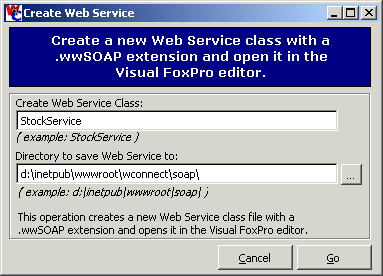
Easy enough. So, now lets set this up as a Web Service that can be generically called from other applications. To do this with Web Connection you can use the Create Web Service option of the Web Connection Management Console. To start the console type: DO CONSOLE and you'll get the wizard shown in Figure 1.
Figure 1 – Creating a new Web Service involves specifying of a new file to create the Web Service class into. The template contains the class plus a small loader function.
In the dialog you need to specify a file location for the Web Service. This file should be placed into a Web virtual directory, because the Web Server will actually access this file and route it to the Web Connection Web Service handler via the .wwSOAP script map extension. The actual template generated looks like this:
*** DO NOT REMOVE - CALL WRAPPER
PARAMETERS lcMethod, lcParmString, lvResult
PRIVATE _loServer
_loServer = CREATEOBJECT("StockService")
lvResult = Eval("_loServer."+ lcMethod + "(" + lcParmString+ ")" )
RETURN lvResult
ENDFUNC
*** DO NOT REMOVE - CALL WRAPPER
*************************************************************
DEFINE CLASS StockService AS Session OLEPUBLIC
*************************************************************
*** Remove after testing
FUNCTION Test(lcEcho)
IF EMPTY(lcEcho)
RETURN "Test Result"
ENDIF
RETURN lcEcho
ENDDEFINE
*EOC test
The Web Service consists of a small loader that's called by the Web Connection Web Service engine, which in turn loads the class and calls the method in question. Note that the class is created with the OLEPUBLIC keyword. The Web Connection Web Service classes don't load this class as a COM object however – the OLEPUBLIC is only used to create an SDL file for consumption by MS SOAP as well as providing the ability to compile your object into COM object that can be called from an MS SOAP hosted Web Service. More on that later.
The Wizard also generates a test method into the class as well so you can check out the Web Service easily. Let's remove that test class and instead add our GetStockQuoteSimple() function into the class as a method like this:
*************************************************************
DEFINE CLASS StockService AS Session OLEPUBLIC
*************************************************************
************************************************************************
* SOAPService :: GetStockQuoteSimple
****************************************
*** Function: Returns a stock quote by symbol
*** Assume: Must be connected to Web and msn.moneycentral.com
*** Pass: lcSymbol -
*** Return: Last stock price in string format
************************************************************************
FUNCTION GetStockQuoteSimple(lcSymbol)
lcSymbol = UPPER(lcSymbol)
oHTTP=CREATEOBJECT("wwHTTP")
lcHTML=oHTTP.HTTPGet("http://www.msnbc.com/tools/newsalert/nagetstk.asp?s=" + lcSymbol)
RETURN EXTRACT(lcHTML,"N=",CHR(13),CHR(10))
ENDFUNC
* SOAPService :: GetStockQuoteSimple
ENDDEFINE
*EOC test
That's all there's to it! Voila, you've created your first Web Service!
Before you go on make sure the Web Connection Server is running. Note that Web Services in Web Connection are dynamically compiled both under VFP 6 and 7. This means that you can make changes to the Web Service while the Web Connection server is running and without stopping the Web service.
Calling the Web Service
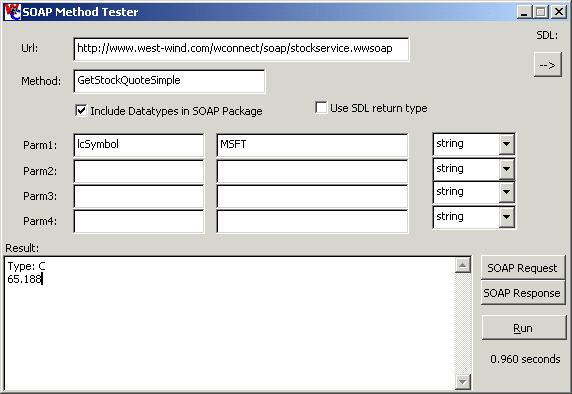
Let's make sure that the service actually works. Since this service exists on the Internet on the West Wind Web Site I'll use that as an example. wwSOAP includes a SOAP Method Tester form that you can use to quickly check out a Web Service. Figure 2 shows how to set up the form to call our newly created Web Service:
Figure 2 – The SOAP method tester allows you to quickly test Web Services without writing any code.You can also view the SOAP Request and Response to see what the SOAP messages look like.
Fill in the URL to the Web Service in this case the I used the service running on the West Wind Web Site. If you're testing on your local machine use localhost and the virtual directory that you copied the Web Service to instead. Enter the method name and each of the parameters required, in this case on the symbol and set the type. Note what happens if you play with the types. Try passing an integer instead of a string. You get an error, which is the error message thrown by the FoxPro Web Service code: Variable 'LCHTML' is not found. wwSOAP embeds type information into the SOAP messages and the Web Service on the other end interprets those types. So when you passed an integer from the client it gets passed to the server application which fails in the GetStockQuoteSimple() method call because we didn't check for a non-string input parameter.
If you click on the SOAP Request button you can look at the request packet traveling over the wire:
<SOAP-ENV:Envelope xmlns:SOAP-ENV="http://schemas.xmlsoap.org/soap/envelope/"
SOAP-ENV:encodingStyle="http://schemas.xmlsoap.org/soap/encoding/"
xmlns:xsi="http://www.w3.org/1999/XMLSchema-instance"
xmlns:xsd="http://www.w3.org/1999/XMLSchema">
<SOAP-ENV:Body>
<GetStockQuoteSimple>
<lcSymbol xsi:type="xsd:string">MSFT</lcSymbol>
</GetStockQuoteSimple>
</SOAP-ENV:Body>
</SOAP-ENV:Envelope>
This is a basic SOAP request envelope that consists of the following sections:
- The SOAP Envelope
The envelop contains the SOAP header that define the SOAP and related namespaces such as xsi and xsd used for data types. The envelop can also contain an optional <headers> section that lets you provide custom headers to a request. Custom SOAP server implantations can read info from the header and use it internally.
- The SOAP Body
This is the meat of the SOAP packet. It contains the method call interface. In the request this consists of the name of the method to call on the server and all of the parameters passed. The parameters are each described as sub-elements of the method and with wwSOAP are typed with XML types.
The SOAP response is very similar:
<SOAP-ENV:Envelope xmlns:SOAP-ENV="http://schemas.xmlsoap.org/soap/envelope/"
SOAP-ENV:encodingStyle="http://schemas.xmlsoap.org/soap/encoding/"
xmlns:xsi="http://www.w3.org/1999/XMLSchema-instance"
xmlns:xsd="http://www.w3.org/1999/XMLSchema">
<SOAP-ENV:Body>
<GetStockQuoteSimpleResponse>
<return xsi:type="xsd:string">65.188</return>
</GetStockQuoteSimpleResponse>
</SOAP-ENV:Body>
</SOAP-ENV:Envelope>
The layout of the SOAP Response is identical to the Request with the exception that here the return value is returned in the body section.
The SOAP Method Tester uses the wwSOAP client behind the scenes to perform the SOAP method calls. Let's see what we have to do to call the service with code:
* Function GetStockQuoteSimpleSOAP
LPARAMETERS lcSymbol
IF EMPTY(lcSYMBOL)
lcSymbol = "MSFT"
ENDIF
*** Load wwSOAP dependencies
DO wwSOAP
oSOAP = CREATEOBJECT("wwSOAP")
oSOAP.cServerUrl = "http://www.west-wind.com/wconnect/soap/stockservice.wwsoap"
oSOAP.AddParameter("lcSymbol","MSFT")
lcPrice = oSOAP.CallMethod("GetStockQuoteSimple")
IF oSOAP.lError
MESSAGEBOX(oSOAP.cErrorMsg)
RETURN
ENDIF
? lcSymbol + ":", lcPrice
? "Result Type: " + VARTYPE(lcPrice)
Pretty easy, eh? You basically specify the URL to call, add parameters then call the method. CallMethod() goes out and does all of the hard work of packaging up your parameters into the SOAP XML packet, sending the request over the wire and decoding the result into a simple return value. wwSOAP also includes low level methods that let you do these steps independently and properties like cRequestXML and cResponseXML let you view what goes over the wire. The wwSOAP documentation help file includes examples on how to do this.
Notice when you run this that the Web Service returns a character value. That's not really a big problem – you can just run VAL() on the returned quote, but it would be much nicer if the server actually did this for us. Since wwSOAP and most SOAP applications understand embedded types in the SOAP packet we can make a simple change in our Web Service code to return a numeric value. Just change the last line in the GetStockQuoteSimple method of the Web Service to:
RETURN VAL( EXTRACT(lcHTML,"N=",CHR(13),CHR(10)) )
Save, then simply re-run the SOAP test code above and notice that now the value returned is a numeric value! Notice how simple this process is: You didn't have to recompile or stop the server. You simply change the code and the new value is immediately returned to you.
Expanding the Stock Web Service with Objects
Returning a single value like a stock is nice, but it's not all that useful. If you wanted to retrieve information about a stock you'd probably want to know a few things about the stock. Like the high and low and change for the day, the actual time of the quote and a few other things. You could set up multiple Web Service methods that return each of these values and then make several SOAP calls to these methods, but this would be vastly inefficient since it requires multiple round trips to the server. SOAP calls have a fair amount of overhead in the packaging and unpackaging of parameters and return values, and passing that data over the Web and through the Web Server. There is a base amount of overhead that occurs for every hit in addition to the time it takes to run the actual request, so bundling up data into a single SOAP package is a big advantage.
For this reason SOAP supports embedding of object parameters and return values. Since VFP can return objects from method calls and wwSOAP supports objects you can create a method that returns an object as a result value. There's a catch though as we'll see in a minute: The client side must provide an object instance to receive the SOAP result.
To demonstrate lets add a new method to our Web Service called GetStockQuote which will return an object that contains several properties retrieved from a stock quote retrieved from the NASDAQ Web site. The NASDAQ site provides quotes in XML format and this method retrieves values from this XML packet:
************************************************************************
* StockService :: GetStockQuote
****************************************
*** Function: Returns a Stock Quote
*** Assume: Pulls data from msn.moneycentral.com
*** Pass: lcSymbol - MSFT, IBM etc.
*** Return: Object
************************************************************************
FUNCTION GetStockQuote(lcSymbol as String) as Object
lcSymbol = UPPER(lcSymbol)
oHTTP = CREATEOBJECT("wwHTTP")
lcHTML=oHTTP.HTTPGet("http://quotes.nasdaq.com/quote.dll?page=xml&mode=stock&symbol=" +;
lcSymbol)
loQuote = CREATEOBJECT("Relation")
loQuote.AddProperty("cSymbol",lcSymbol)
loQuote.AddProperty("cCompany",EXTRACT(lcHTML,"<issue-name>","</issue-name>"))
loQuote.AddProperty("nNetChange",;
VAL(Extract(lcHTML,"<net-change-price>","</net-change-price>")))
loQuote.AddProperty("nLast",;
VAL(EXTRACT(lcHTML,"<last-sale-price>","</last-sale-price>")))
loQuote.AddProperty("nOpen",;
VAL(Extract(lcHTML,"<previous-close-price>","</previous-close-price>")))
loQuote.AddProperty("nHigh",;
VAL(Extract(lcHTML,"<todays-high-price>","</todays-high-price>")))
loQuote.AddProperty("nLow",;
VAL(Extract(lcHTML,"<todays-low-price>","</todays-low-price>")))
loQuote.AddProperty("nPERatio",;
VAL(Extract(lcHTML,"<current-pe-ratio>","</current-pe-ratio>")))
lcOldDate = SET("DATE")
SET DATE TO YMD
lcDate=Extract(lcHTML,"<trade-datetime>","</trade-datetime>")
loQUote.AddProperty("tUpdated",;
CTOT( SUBSTR(lcDate,1,4)+"/" + SUBSTR(lcDate,5,2) + "/" +;
SUBSTR(lcDate,7,2) + SUBSTR(lcDate,9) ))
SET DATE TO &lcOldDate
RETURN loQuote
This code retrieves the XML based stock quote from NASDAQ and then parses several of the XML properties into object properties for easier access and returns the newly created object over SOAP.
If you now call this method with the SOAP Method Tester you can use:
Url: http://www.west-wind.com/wconnect/soap/stockservice.wwsoap
Method: GetStockQuote
Parameter: lcSymbol - MSFT - string
The result that is returned is an XML fragment that looks like this:
<return xmlns:xsi="http://www.w3.org/1999/XMLSchema-instance" xsi:type="record">
<ccompany>Microsoft Corporation</ccompany>
<csymbol>MSFT</csymbol>
<nhigh>66.13</nhigh>
<nlast>65.19</nlast>
<nlow>61.13</nlow>
<nnetchange>3.31</nnetchange>
<nopen>61.88</nopen>
<nperatio>38.12</nperatio>
<tupdated>2000-10-20T00:00:00</tupdated>
</return>
The SOAP Method tester simply displays this XML fragment, but when you use code to call this method you can actually retrieve the object directly.
Here's the client code to do this:
* Function GetStockQuoteSOAP
LPARAMETERS lcSymbol
IF EMPTY(lcSYMBOL)
lcSymbol = "MSFT"
ENDIF
*** Load wwSOAP dependencies
DO wwSOAP
oSOAP = CREATEOBJECT("wwSOAP")
oSOAP.cServerUrl = "http://www.west-wind.com/wconnect/soap/stockservice.wwsoap"
oSOAP.AddParameter("lcSymbol","MSFT")
*** Create object to be filled with result
loQuote = CREATEOBJECT("cStockQuote")
lcPrice = oSOAP.CallMethod("GetStockQuote",,loQuote)
IF oSOAP.lError
MESSAGEBOX(oSOAP.cErrorMsg)
RETURN
ENDIF
? "Last: ",loQuote.nLast
? loQuote.cCompany
? "Net Change: ",loQuote.nNetChange
? "Updated on: ",loQuote.tUpdated
? VARTYPE(loQuote)
DEFINE CLASS cStockQuote as Relation
cSymbol=""
cCompany=""
nLast=0.00
nOpen=0.00
nHigh=0.00
nLow=""
nNetChange=0.00
nPERatio=0.00
tUpdated={ : }
ENDDEFINE
wwSOAP uses the included wwXML class for serializing and deserializing objects, so there are a few limitations:
Objects are serialized and deserialized using custom properties only.
VFP native properties are ignored.
You can set the wwSOAP::lRecurseObjects property to also serialize child objects. wwXML supports child objects, but not containership for objects added with AddObject() or ADD OBJECT.
For more info on wwXML and serialization of objects see our Building distributed applications with XML messaging article.
That's pretty cool, isn't it? Now you can simply have the server return objects that you can serialize over the wire with SOAP and rebuild these objects on the client side by deserializing them into existing objects.
Building a Web Page that uses the Web Service
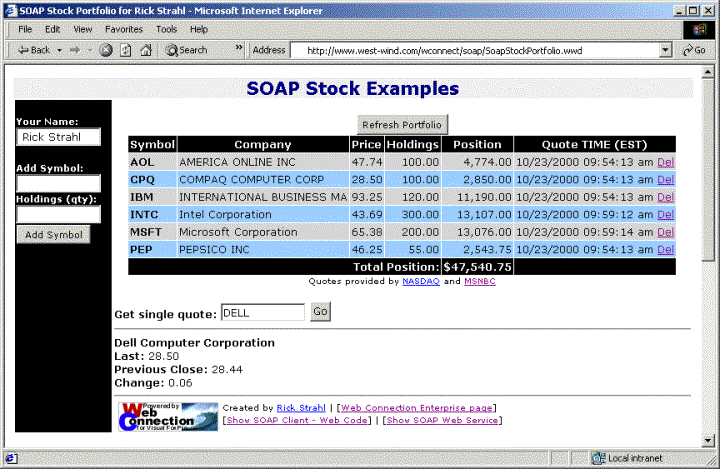
Ok, let's put the Web Service to use in a Web Application. What we want to do is retrieve several stock quotes and show them on a Web server driven portfolio manager form. Figure 3 shows this sample application in operation on the West Wind Web site.
As you can see in Figure 3 a portfolio consists of several stocks that are stored in portfolio table with a customer id that is to be tracked (in this case simply with a Session id attached to a cookie for the demo's sake). The application backend needs to retrieve a live quote for each one of the stocks in the portfolio. As I mentioned previously making repeated SOAP calls to the server to retrieve each quote individually is not a great idea from a performance point of view, so rather than making one SOAP call per stock I decided to add another method to my Web Service that receives an XML input with a list of stocks, and an XML output that returns several objects – one for each stock – in a single XML document. I'll use wwXML for the packaging of those objects.
Figure 3 – This SOAP Stock Portfolio example retrieves stock quotes via SOAP and demonstrates server to server and browser to server SOAP communication.
Add the following method to the Web Service:
************************************************************************
* StockService :: GetStockQuotes
****************************************
*** Function: Returns a set of Stock Quotes based on an XML input
*** string <quotes><symbol>IBM</symbol><symbol>MSFT</symbol><quote>
*** Assume: Pulls data from msn.moneycentral.com
*** Pass: lcSymbol - MSFT, IBM etc.
*** Return: Object
************************************************************************
FUNCTION GetStockQuotes(lcXMLSymbols as String) as String
LOCAL oDOM, lcXML, x, loQuotes, loQuote
IF EMPTY(lcXMLSymbols)
RETURN ""
ENDIF
oDOM = CREATEOBJECT("Microsoft.XMLDOM")
oDOM.LoadXML(lcXMLSymbols)
IF !EMPTY(oDOM.ParseError.Reason)
RETURN ""
ENDIF
loQuotes = oDOM.selectnodes("/quotes/symbol")
IF ISNULL(loQuotes)
RETURN ""
ENDIF
loXML = CREATEOBJECT("wwXML")
lcXML = ""
FOR x = 0 to loQuotes.Length -1
lcSymbol = loQuotes.item(x).Text
loQuote = THIS.GetStockQuote(lcSymbol)
IF ISNULL(loQuote)
LOOP
ENDIF
lcQuoteXML = loXML.CreateObjectXML( loQuote,"quote" )
lcXML = lcxML + STRTRAN(lcQuoteXML,"<quote>",[<quote symbol="]+lcSymbol+[">])
ENDFOR
lcXML = [<?xml version="1.0"?>] + CHR(13) + CHR(10) + ;
[<stockquotes>] + ;
lcXML + ;
[</stockquotes>]
RETURN lcXML
ENDFUNC
The method receives an input XML string that retrieves XML in the following format:
<quotes>
<symbol>MSFT</symbol>
<symbol>IBM</symbol>
</quotes>
The symbols are retrieved using the XMLDOM parser. The for loop runs through all of the Symbol nodes in the XML document.
For each symbol, a call to GetStockQuote() is made which goes out to the NASDAQ site and retrieves a single quote as an object. This object is turned into an XML fragment with wwXML::CreateObjectXML() which is concatenated with the other symbol retrievals to create a large XML document.
You can review the full source code of about 100 lines of code and the HTML script page used to display the page by clicking on the Show Code links on the bottom of the page. The Web Service relevant piece of code in the Web server processing occurs in the following block:
*** Now Refresh the profile
IF llRefresh
*** Select all items for this user
SELECT * from Portfolio ;
where UserId = lcUserId ;
INTO Cursor TQuery
oSOAP = CREATEOBJECT("wwSOAP")
*** Create stock quote request in XML format
*** This will be our SOAP parameter
lcXML = ;
[<?xml version="1.0"?>] + CRLF +;
[<quotes>] + CRLF
SCAN
lcxml = lcxml + ;
[<symbol>] + symbol + [</symbol>] + CRLF
ENDSCAN
lcXML = lcXML + [</quotes>] +CRLF
*** SOAP CALL RIGHT HERE ***
*** Make the SOAP call and retrieve XML result
oSOAP.cServerUrl = "http://www.west-wind.com/wconnect/soap/stockservice.wwsoap"
oSOAP.AddParameter("lcXMLSymbols",lcXML)
lvResult = oSOAP.CallMethod("GetStockQuotes")
IF oSOAP.lError
THIS.errormsg("SOAP Error",oSOAP.cErrorMsg)
RETURN
ENDIF
*** Parse the XML result
loQuote = CREATEOBJECT("Quote")
oDOM = CREATEOBJECT("Microsoft.XMLDOM")
oDOM.LoadXML(lvResult)
IF !EMPTY(oDOM.parseerror.reason)
THIS.errormsg("XML Result Error",oDOM.parseerror.reason)
RETURN
ENDIF
*** Loop through all of the quotes and update
*** the user's portfolio
LOCATE
SCAN
*** Load each symbol into an object
lcSymbol = TRIM(Symbol)
loSymbol = oDOM.selectSingleNode("/stockquotes/quote[@symbol='" + lcSymbol+ "']")
IF ISNULL(loSymbol)
LOOP
ENDIF
loXML = CREATEOBJECT("wwXML")
loQuote = loXML.ParseXMLToObject(loSymbol,loQuote)
IF !ISNULL(loQuote)
SELECT Portfolio
LOCATE FOR UserId = lcUserId AND SYMBOL = lcSymbol
REPLACE Descript with loQuote.cCompany,;
updated with loQuote.tUpdated,;
price with loQuote.nLast
ENDIF
ENDSCAN
pcMessage = "Portfolio refreshed at: " + TIME() + " PST"
ENDIF
*** End of refreshing profile
The code starts by building an XML string that contains all the symbols to retrieve from the portfolio. That string is then used in the SOAP call as a parameter to the GetStockQuotes() method call. Notice that the actual SOAP call in this example is 3 lines of code plus error checking. Once the call returns it should have returned to us an XML string that contains a set of quote objects for each of the symbols in the portfolio.
The result string looks something like this:
<?xml version="1.0"?>
<stockquotes><quote symbol="INTC">
<ccompany>Intel Corporation</ccompany>
<csymbol>INTC</csymbol>
<nhigh>44.38</nhigh>
<nlast>44.13</nlast>
<nlow>42.69</nlow>
<nnetchange>1.06</nnetchange>
<nopen>43.06</nopen>
<nperatio>29.42</nperatio>
<tupdated>2000-10-23T10:20:59</tupdated>
</quote>
<quote symbol="MSFT">
<ccompany>Microsoft Corporation</ccompany>
<csymbol>MSFT</csymbol>
<nhigh>66.25</nhigh>
<nlast>64.13</nlast>
<nlow>64</nlow>
<nnetchange>-1.06</nnetchange>
<nopen>65.19</nopen>
<nperatio>37.50</nperatio>
<tupdated>2000-10-23T10:21:00</tupdated>
</quote>
</stockquotes>
Once this result is retrieved the code loops through the portfolio for the user again and retrieves a node reference to each of the symbols by using and XSLT query to retrieve each of the symbol nodes:
loSymbol = oDOM.selectSingleNode("/stockquotes/quote[@symbol='" + lcSymbol+ "']")
From here the node can be imported into an object using wwXML and the low level ParseXMLToObject() method which takes an XML node as input and parses the properties below it into the object provided:
loQuote = loXML.ParseXMLToObject(loSymbol,loQuote)
At this point the object is filled with the appropriate data and the portfolio record in the table is updated with this data using a standard VFP REPLACE command to fill in the data from the loQuote object.
SOAP Browser Clients
So far you may find that what I presented doesn't show huge improvements over what you can accomplish with straight XML messaging. The main reason is that some of the tools like wwXML's data conversions can make short work of generating and importing XML easily. However, if you're not using high level tools SOAP's advantages become much more obvious. To demonstrate I used SOAP to retrieve a single stock quote from the HTML based Web page.
In this scenario, only client side Jscript code in Internet Explorer 5.0 and later is used to make the SOAP method call and display the data in the browser without refreshing the entire Web page. If you look at figure 3 again, you can see the Get Single Quote textbox and the Go button. The Go button points to some Jscript in the Web page:
SCRIPT SRC="wwsoap.js"></script>
<script>
SERVER_URL = "http://www.west-wind.com/wconnect/soap/stockservice.wwsoap";
oDOM = null;
cPk = 0
function GetQuote() {
gcParameters = ""
addParameter("lcSymbol",document.forms[0].symbol.value,"string")
/// make the call - XML string result (object)
lvResult = CallMethod("GetStockQuote",SERVER_URL);
if (lvResult.length == 0) {
alert("Invalid SOAP Response")
return
}
oDOM = new ActiveXObject("Microsoft.XMLDOM");
oDOM.loadXML(lvResult);
if (oDOM.parseError.reason != "") {
alert( oDOMparseError.reason);
return;
}
lcHTML = "<hr><b>" + oDOM.selectSingleNode("/return/ccompany").text +
"</b><br><b>Last:</b> " + oDOM.selectSingleNode("/return/nlast").text +
"<br><b>Previous Close:</b> " + oDOM.selectSingleNode("/return/nopen").text +
"<br><b>Change:</b> " + oDOM.selectSingleNode("/return/nnetchange").text ;
quoteresult.innerHTML = lcHTML;
}
</script>
When you click on the Go button, a SOAP call is initiated from the browser. The actual library functions for this are contained in wwsoap.js (you can look at that from the sample page as well – there's a link on the bottom for it). The key features are the AddParameter and CallMethod functions which work like their counterparts in wwSOAP. The difference is that Jscript doesn't support objects so these functions are not set up as methods. The Jscript SOAP implementation I created is also very basic and rather crude, but it will work well against the Web Connection Web Service and MS SOAP clients. wwSOAP.js uses the XMLHTTP component to communicate with the Web Server and retrieve the data.
Since Jscript doesn't support objects and GetStockQuote() returns and object, the Jscript wwsoap implementation returns an XML string as a result value. This string is loaded into the XMLDOM and then the individual values are retrieved and build up into an HTML string, which is simply replaced into the HTML document. The entire section below the Quote text box is dynamically generated using a <span> tag whose .innerHTML property is set by the HTML created.
Creating SDL files and MS SOAP compatibility
The examples I've shown where all built for West Wind Web Connection, but they can easily be applied to other development tools.
You can take the StockService Web Service we created and use it with MS SOAP by simply compiling the Web Service into a COM object (make sure you add all dependent files to the project – they won't automatically get pulled in) and then running the MS SOAP SDL Wizard to generate the SDL and ASP files. You can look at the MS SOAP article on details for this.
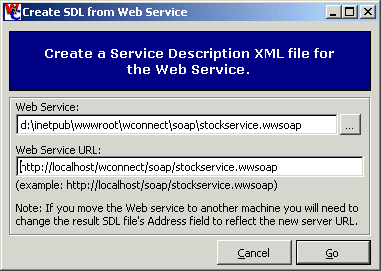
Web Connection however, can also create an SDL file from your Web Service. This is a requirement in order for a Web Service to work with the MS SOAP client. To perform this task Web Connection contains a Wizard for generating the SDL file from an existing Web Service class as shown in Figure 4.
If you want to build browser applications that use SOAP or any kind of XML based communication the Microsoft.XMLHTTP component is the tool to use when accessing HTTP content over the Web. XMLHTTP provides complete HTTP access with a few lines of code. Unfortunately making calls against a different domain than the one that you got the page from results in a nasty error message that tells you of cross-domain data access. By default IE's security settings disable cross-domain access and simply fails.
There are two ways to fix this:
1) Go into the security settings for IE and configure cross-domain access so that it is allowed or at the very least prompts you instead of simply failing.
2) Set up the other domain that is accessed as a trusted zone in Internet Explorer. This bypasses any of the security checks that normally occur.
For public access applications neither of these options are very pleasant. In my own apps, I've had to resort to putting notes on the screen to let people know how to configure their browsers.
This is one reason why SOAP is important – you can use SOAP on the server side to consolidate data from multiple sources and then feed the combined data from the current Web site, which avoids the cross-domain problems.
Figure 4 – The SDL Creation Wizard takes a Web Service class and generates a Service Description XML file from it.
An SDL file basically describes the functionality of a Web Service and acts as a sort of type library. The MS SOAP Toolkit actually requires use of an SDL file both on the client and the server side of a Web Service implementation, so any type of Web Service that wants to be accessed through MS SOAP must expose an SDL file.
The SDL Wizard generates an SDL file from any PRG file that contains an embedded OLEPUBLIC class with the same name as the file. So, if I have StockService.wwSOAP and a StockService class inside of it an SDL file called StockService.xml is generated in the same directory as the Web Service. Note that .wwSOAP files are really just PRG files with a different extension, so this Wizard will work on any PRG based class.
What gets generated is SDL that's compatible with the MS SOAP toolkit. Unfortunately, SDL specifications are not really specifications and Microsoft currently has 3 different implementations of it: The MS SOAP toolkit, the .Net implementation and the new forthcoming WSDL specification which supposedly will be supported both by .Net and MS SOAP. The current Wizard generates MS SOAP compatible SDL, because that is the only shipping SDL format that you're likely to find at the moment.
The generated SDL file for our Stock Service looks as follows:
<?xml version='1.0' ?>
<!-- Generated by West Wind SOAP Helper at 10/23/2000 07:05:34 PM -->
<serviceDescription name='stockservice'
xmlns='urn:schemas-xmlsoap-org:sdl.2000-01-25'
xmlns:dt='http://www.w3.org/1999/XMLSchema'
xmlns:stockservice='stockservice'
>
<import namespace='stockservice' location='#stockservice'/>
<soap xmlns='urn:schemas-xmlsoap-org:soap-sdl-2000-01-25'>
<interface name='stockservice'>
<requestResponse name="GetStockQuoteSimple">
<request ref="stockservice:GetStockQuoteSimple"/>
<response ref="stockservice:GetStockQuoteSimpleResponse"/>
<parameterorder>lcSymbol</parameterorder>
</requestResponse>
<requestResponse name="GetStockQuotes">
<request ref="stockservice:GetStockQuotes"/>
<response ref="stockservice:GetStockQuotesResponse"/>
<parameterorder>lcXMLSymbols</parameterorder>
</requestResponse>
<requestResponse name="GetStockQuote">
<request ref="stockservice:GetStockQuote"/>
<response ref="stockservice:GetStockQuoteResponse"/>
<parameterorder>lcSymbol</parameterorder>
</requestResponse>
</interface>
<service>
<addresses>
<address uri='http://localhost/wconnect/soap/stockservice.wwsoap'/>
</addresses>
<implements name='stockservice'/>
</service>
</soap>
<stockservice:schema id='stockservice' targetNamespace='stockservice'
xmlns='http://www.w3.org/1999/XMLSchema'>
<element name="GetStockQuoteSimple">
<type>
<element name="lcSymbol" type="dt:string"/>
</type>
</element>
<element name="GetStockQuoteSimpleResponse">
<type>
<element name="return" type="dt:integer"/>
</type>
</element>
<element name="GetStockQuotes">
<type>
<element name="lcXMLSymbols" type="dt:string"/>
</type>
</element>
<element name="GetStockQuotesResponse">
<type>
<element name="return" type="dt:string"/>
</type>
</element>
<element name="GetStockQuote">
<type>
<element name="lcSymbol" type="dt:string"/>
</type>
</element>
<element name="GetStockQuoteResponse">
<type>
<element name="return" type="dt:object"/>
</type>
</element>
</stockservice:schema>
</serviceDescription>
There are a couple of key elements in an SDL file. The top section describes the interface of the Web Service: The name of the methods and the parameters it expects as well as pointers to the implementation section of the schema. The implementation is provided below and shows in detail what types are passed as parameters and and what return types are returned.
Note that the GetStockQuote method of the Web Service returns an object parameter with MS SOAP does not understand, so it will fail on this call. You can change the type manually to dt:string to work around this, but realize that you'd have to parse the XML manually.
The other important thing in the SDL file is the <address> fragment which determines the locations of the actual Web Service request handler. It's important that you remember to either change this value or re-run the Wizard when you move your Web Service between a development machine and the live Web Server because the URLs likely will change. Here I generated it to localhost for local testing. When I put it online I'll want to call the service on www.west-wind.com.
We can test this out real quick using the MS SOAP Toolkit with the following code:
oWire=CREATEOBJECT("Rope.WireTransfer")
lcXML = oWire.GetPageByURI("http://localhost/wconnect/soap/stockservice.xml")
*** Work around VFP COM case bug
lcXML = STRTRAN(lcXML,"GetStockQuoteSimple","getstockquotesimple")
oProxy = CREATEOBJECT("Rope.Proxy")
? oProxy.LoadServicesDescription(2, lcXML) && 1
lvResult = oProxy.GetStockQuoteSimple("MSFT")
? "Result Type: ",VARTYPE(lvResult)
? lvResult
oWire = .F.
oProxy = .F.
and it will correctly return me the stock quote. Note that although the SDL file marks the return value as integer, MS SOAP will always return a string.
The big SOAP down
I've been using SOAP on a couple of projects now and we're finding that building Web Services is a huge timesaver, because it's real easy to build server functionality. We're also finding that although SOAP greatly simplifies building distributed applications in many cases, we still end up using XML extensively as parameters for method calls in order to avoid continuous server round trips. Most sample Web Services out there today are returning unrealistic types of information that does not reflect real life applications. For SOAP to really be useful objects or other compound data needs to be passed. Passing objects is a good option, but for generic access this gets difficult to implement because the client application will have to deserialize the object into an existing structure, which requires some coupling. Object support varies greatly for the various SOAP implementations and some, notably the MS SOAP toolkit don't support objects at all, so passing data in XML format continues to be a common requirement even with SOAP.
There is also a mental hurdle to overcome with SOAP especially for those of us that have used XML in distributed applications before. Raw XML is simple and elegant and with the right tools it takes very little code to build XML solutions without requiring SOAP in the middle. In fact, when I first put out my SOAP implementation I asked around for some solutions that would really highlight a SOAP interface as opposed to a custom XML implementation. Lots of suggestions came up, but the reality is that none of them screamed out and said SOAP is the clear choice. The examples that were perfect for SOAP mostly revolved around simplistic examples that passed in single values and returned a single or multiple simple results. Most real-world applications don't work that way! This means you need to either objects with the varying support or you're back to using XML to pass as parameters with all the manual parsing this involves. I can live with that since we use XML extensively in every application anyway and we have tools like wwXML to make use of that XML nearly transparent. But those unfamiliar with XML or not using high level tools will not see that much of a benefit from SOAP over a custom XML implementation.
The big benefit of SOAP is a common interface that is universal. SOAP clients are already available for almost any platform and most let you make the SOAP call with just a couple of lines of code as I've shown. .Net takes this one step further and directly integrates remote calls into the environment which based on compiler settings can tell whether an object is local or remote and transparently call the remote object. As nice as that sounds, right now .Net is the only thing that can talk to .Net even it uses SOAP underneath the covers, as the implementation is proprietary relying on a custom SDL file format. This will likely change by the time .Net is ready, but right now it's just another piece in the puzzle to figure out.
On the downside when comparing SOAP to a plain XML solution is that SOAP has more overhead. For many applications that pass complex data around double XML parsing occurs. One to create your actual XML messages (object packaged as parameters or return values) or XML string parameters. And then there's the actual creation of the SOAP package and content. Request times over the Internet are good with most examples I ran taking under 1 second including Web round trips on a slow dial-up connection. This will be fine for most distributed applications, but it's not a replacement for a high performance application that uses DCOM now, which on the same network would run around 1,000 times faster making the same method call.
Still, getting familiar with SOAP and Web Services now is a good idea, because it's here to stay. Exposing your application logic with Web Services today will make sure that those services can be consumed by future applications that will be built around the SOAP standard. In the future SOAP tools will become even easier than what I've shown here. Languages will natively support SOAP so that objects can be accessed locally or globally using the same syntax. For today, we have to do a little more work, but we also get the benefit of full control – we can actually see what's happening under the hood.
SOAP is underlying a lot of Microsoft's new technology, especially .Net, so I would encourage you to learn more about it and start using it as it will prepare you for what's to come. The tools are here today, so you can use and integrate this technology today… Get to it!
Rick Strahl is president of West Wind Technologies on Maui, Hawaii. The company specializes in Web and distributed application development and tools with focus on Windows 2000 and Visual Studio. Rick is author of West Wind Web Connection, a powerful and widely used Web application framework for Visual FoxPro, West Wind HTML Help Builder and co-author of Visual WebBuilder. He's also a Microsoft Most Valuable Professional, and a frequent contributor to FoxPro magazines and books. He is co-publisher and co-editor of CoDe magazine, and his book, "Internet Applications with Visual FoxPro 6.0", is published by Hentzenwerke Publishing. For more information please visit: http://www.west-wind.com/.
| Home | White Papers | Message Board | Search | Products | Purchase | News | | |